 Payoutproof
WooCommerce · Stripe, WooPayments & PayPal
Your Stripe payout, reconciled to the cent
Payoutproof is a WooCommerce plugin that turns Stripe and WooPayments payouts into double-entry journal entries that balance exactly against the bank deposit, and reconciles PayPal by period — so the monthly spreadsheet rebuild stops being your job.
Start a free 14-day trial See how it works
No card required No Stripe keys to paste Your data never leaves your site
Every payout is checked against this. If it does not hold, nothing posts.
The arithmetic
One payout, worked
A week of trading for a store doing about 500 orders a month. Your orders report for these seven days says $8,619.25. Your bank says $8,060.30. Neither is wrong, and nothing in WooCommerce connects them.
Four things sit in that $558.95, and only one of them is fees. Two of the three refunds are against orders placed last month, so a spreadsheet built from this week's orders will never find them at all.
The fee is charged per transaction, not per payout. Applying 2.9% + $0.30 to the weekly total gives $284.46. The payout says $284.05. That 41 cents is per-charge rounding, it happens every week, and it is the kind of residue that leaves a reconciliation account nobody can clear.
Payoutproof posts this as a journal entry where debits equal credits and the deposit line equals the bank — or it refuses to post and tells you which of the three checks failed.
Fees at Stripe's published US online card rate, 2.9% + $0.30 per successful charge (stripe.com/pricing). Charge count, refund and adjustment values are a worked example at a $74.95 average order; the arithmetic is the part that matters, and it ties.
The month-end problem
One net figure, and no way back to the orders
A payout arriving in your bank is gross sales, less processing fees, less refunds, less chargebacks, adjusted for currency and reserves, covering orders from several days. Nothing in WooCommerce maps it back.
Today
Rebuilt by hand, every month
- Export the Stripe balance report and the WooCommerce orders
- Line them up in a spreadsheet and hunt the difference
- Find an order whose payment link was never written
- Post a journal you are not certain is right
With Payoutproof
Decomposed, matched, checked
- Install, and it reads the gateway you already have
- Every payout split into its parts, each matched to its order
- Three checks run — anything that fails is parked, with the reason
- Export the month and post it without checking it first
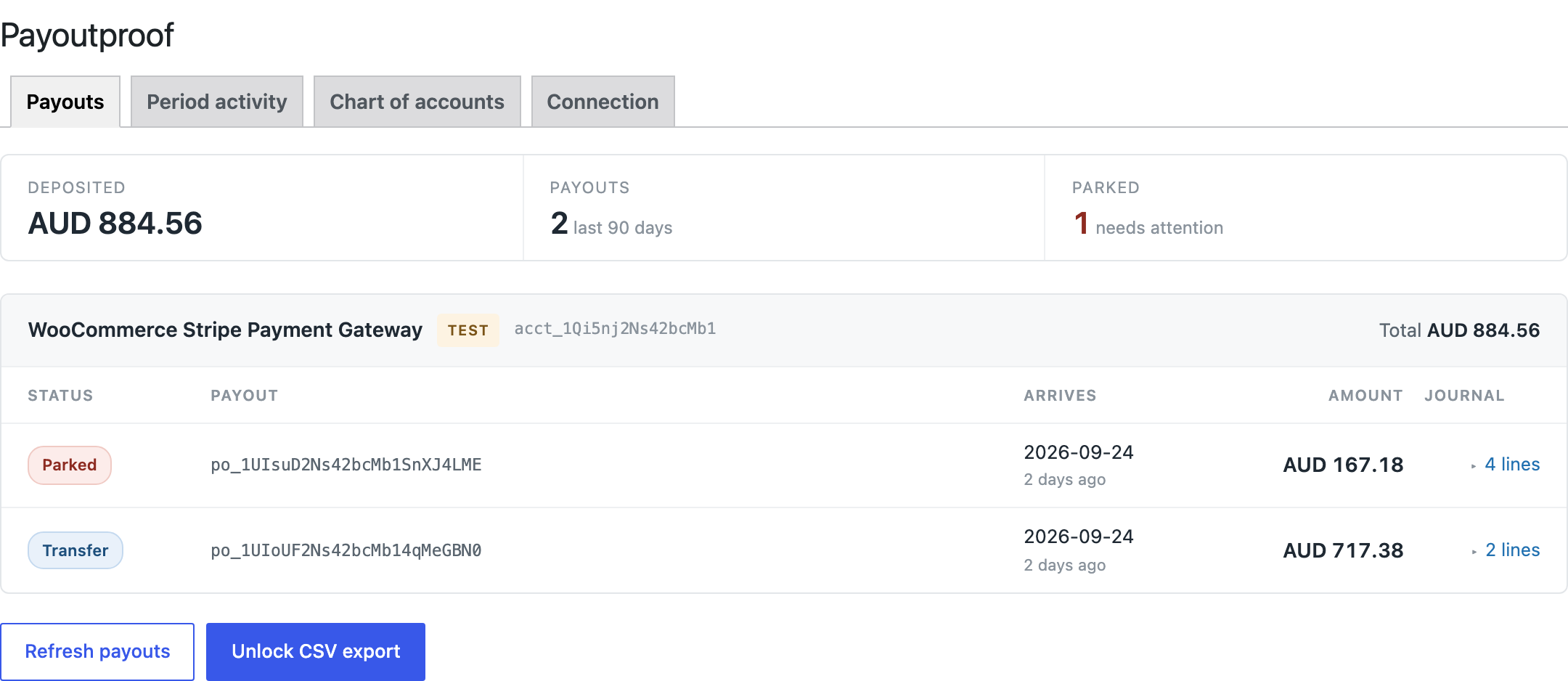
Balanced
The payout settled a known set of transactions, debits equal credits, and the bank line matches. Post it.
Transfer
A manual payout. Complete and correct, but it carries no sales — the revenue behind it is journalled by period.
Parked
A check failed. Nothing posts, and the panel names which check — so you see what to fix rather than that something broke.
What it does
Built for the parts that actually go wrong
Reconciliation fails in specific, boring ways. Each of these is one of them.
Balances, or refuses
Three invariants run on every payout: the transactions sum to the deposit, debits equal credits, and the bank line matches. A silently wrong journal entry costs far more than a missing one, so anything failing a check is parked rather than posted.
Nothing to paste for Stripe
It reads the credentials your Stripe gateway already holds and proves they work before claiming anything. Prefer a read-only restricted key? Enter one instead. PayPal is the exception, and deliberately so — see below.
PayPal, by period
PayPal has no payouts to reconcile — funds sit in a balance and you withdraw when you choose. So it reconciles the period instead: opening balance, every fee and transaction across the window, withdrawals on their own line, closing balance. It is the one gateway you enter credentials for, because the PayPal plugin keeps stale ones in an old option and guessing wrong would balance your month against an account you no longer use.
Works with WooPayments
WooPayments never exposes Stripe API keys, which is why external accounting services cannot reach it at all. Payoutproof runs inside WordPress and reads it directly.
Manual payouts, properly
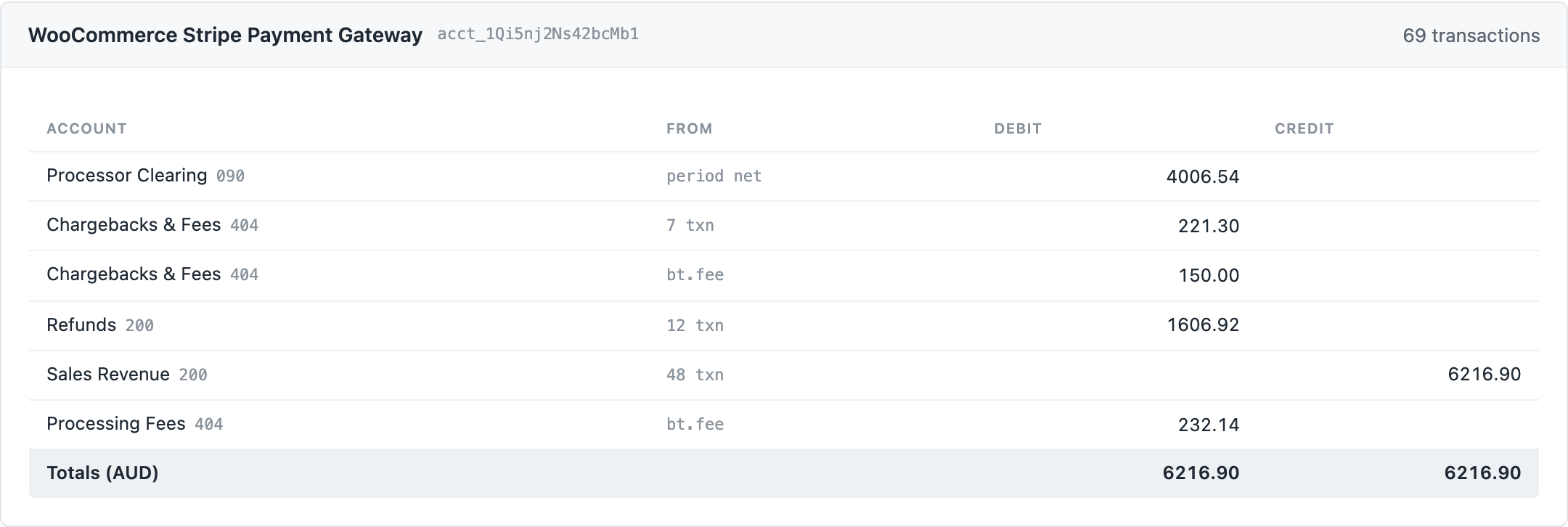
They settle nothing in particular, so they post as clearing-account transfers with the period's activity journalled separately.
Damaged orders still reconcile
Matching goes through Stripe's own metadata first, so orders whose payment link was never written are still found — and can be repaired.
One month, one file
A manual journal CSV most accounting packages accept, or an audit CSV with explicit debit and credit columns. Scoped to a month.
Reconcile your last payout Free plan, no card, no time limit.
Alternatives
How this differs from a spreadsheet or a connector
Most stores reconcile payouts by hand, and some pipe Stripe into their accounting software directly. Both work up to a point. Here is where each one stops.
Swipe the table sideways to see all three columns.
| By hand, in a spreadsheet | External connector | Payoutproof | |
|---|---|---|---|
| Reads WooPayments | Only via CSV export | No — no API keys exist to give it | Yes, directly |
| Stripe, WooPayments and PayPal in one place | Three spreadsheets, three methods | Usually one processor per connector | All three, each on its own books |
| Matches payouts to WooCommerce orders | Manually, one at a time | To Stripe charges, not to your orders | Every transaction, four ways |
| Refuses to post when it does not balance | Nothing stops you | Usually posts anyway | Three checks, or it parks |
| Handles manual payouts correctly | If you know the clearing-account method | Usually attributes them wrongly | Clearing transfer plus period activity |
| Finds orders with a broken payment link | You find them by hand | Cannot see WooCommerce at all | Matches through Stripe metadata, and repairs |
| Where your payment data goes | Onto your laptop | Through a third-party server | Nowhere — it runs inside your site |
| Effort per month | An afternoon, every month | Low, once configured | Open the screen, export the month |
Comparison as at September 2026. “Connector” means a third-party service that reads Stripe over its API and writes into accounting software.
- Free forever, no card. Your three most recent payouts, every journal entry in full.
- 14 days on any paid plan. No card to begin, and nothing charged if you stop.
- It posts nothing to your accounts. Journal entries are produced and exported; you decide what is booked.
- Nothing leaves your site. It talks only to your payment gateways, and stores no copy of your key.
Pricing
Every tier reconciles the same
What changes is history, sites and export — not whether the numbers are right.
Free
$0
To see whether it balances your books at all
- Your 3 most recent payouts
- Every journal entry, in full
- Chart of accounts mapping
- No card, no time limit
Solo
$1916/mo
One store, up to about 300 orders a month
- Unlimited payout history
- CSV export, both formats
- Multiple payment accounts per store
- 1 site
- 14-day trial, no card
Store
$4941/mo
A growing store, up to about 2,000 orders a month
- Everything in Solo
- 5 sites
- 14-day trial, no card
Agency
$9983/mo
Bookkeepers running many client stores
- Everything in Solo
- Unlimited sites
- Priority support
- 14-day trial, no card
The order volumes above are guidance for picking a tier, not limits — no plan caps what Payoutproof will reconcile. Every paid tier has the same features; what changes is how many sites the licence covers. Annual billing is ten months for twelve. 14-day money-back guarantee on every paid plan.
Questions
The things people ask first
Do I need to paste Stripe API keys?
No. Payoutproof reads the credentials your existing WooCommerce Stripe gateway already stores, and verifies them against the Stripe API before using them. If you prefer to narrow its access, you can supply a Stripe restricted key with read access to payouts, balance transactions and charges instead.
Does it work with WooPayments?
Yes, and it is one of the few tools that can. WooPayments never exposes Stripe API keys to the merchant, which means external accounting services cannot reach it at all. Payoutproof runs inside WordPress and reads WooPayments data directly through its own interface.
Does it work with PayPal?
Yes, and it works differently on purpose. PayPal has no payouts to reconcile — funds accumulate in a balance and you withdraw when you choose, so there is no payout object for a journal entry to hang from. Payoutproof reconciles the period instead: opening balance, every transaction and fee across the window, withdrawals as their own line, closing balance, proved against PayPal's own running balance. PayPal is also the one gateway you enter credentials for. That is deliberate: WooCommerce PayPal Payments keeps its old credentials in a previous option key when a merchant reconnects, and an adapter that guessed wrong would reconcile a month against a PayPal account the store no longer uses, with every total looking entirely reasonable.
What happens if a payout does not balance?
It is parked, never posted, and the screen names the check that failed. A journal entry that imports cleanly but is wrong costs far more than one that is missing, so Payoutproof refuses rather than guesses.
Which accounting software can I import into?
Payoutproof exports two CSV layouts: a manual journal with a single signed Amount column and continuation-row grouping, which is the format most accounting packages accept on import, and an audit CSV with explicit Debit and Credit columns.
My payouts are manual rather than automatic. Does that work?
Yes, and it is handled properly. A manual payout is an arbitrary withdrawal from your balance, so Stripe cannot tell you which transactions are in it — there genuinely is no such set. Payoutproof books it as a transfer against a clearing account and journals the period's sales, fees and refunds separately. What remains in clearing is the money still held by your processor, which you can check against Stripe's own balance.
Will it work on a store whose orders are already damaged?
Usually, yes. Orders created through pay-for-order links, the admin screen, or some express checkout paths never receive their Stripe payment intent ID. Payoutproof matches through Stripe's own order metadata first, which survives when the order's own link does not, and it can repair those links as a separate step.
Is my payment data sent anywhere?
No. Payoutproof runs entirely inside your WordPress installation and talks only to your payment provider. There is no third-party service in the path, and no copy of your credentials is stored — the key is read from your gateway at the moment it is needed.
Read first
The reconciliation guide
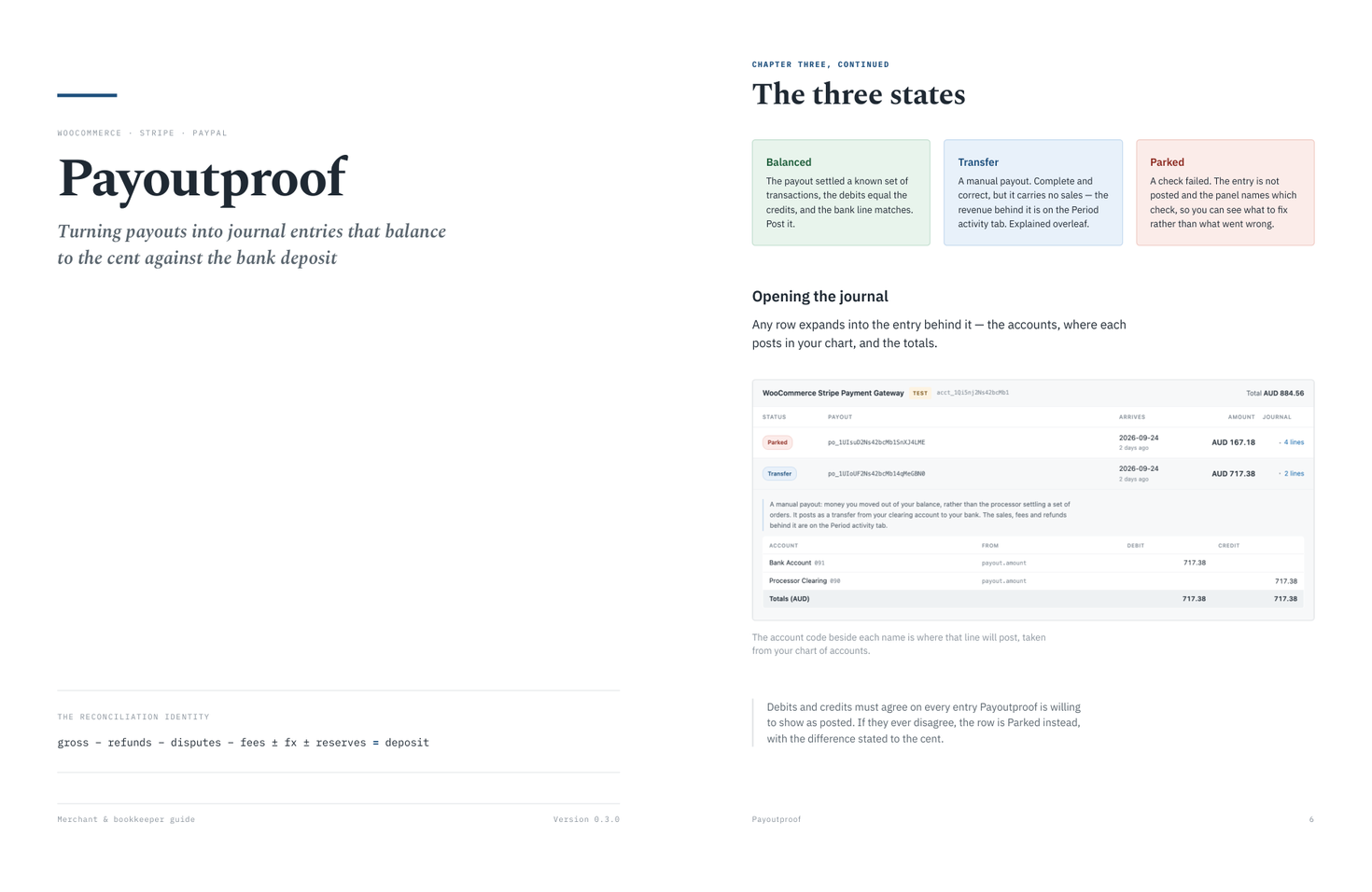
Thirteen pages on what Payoutproof posts and why — the three states a payout can be in, the two-journal model behind manual payouts, the control that proves your books against your processor's own balance, and how each kind of money maps to your chart of accounts. Every figure in it is real output from a live test account, not a mock-up.
13 pages · Letter · 492 KB · no email required
Stop rebuilding the payout in a spreadsheet
Install it, open WooCommerce → Payoutproof, and look at last month. Your three most recent payouts reconcile on the free plan — no card, no time limit — which is enough to see whether the deposit ties to the cent before you decide anything. If it does not tie, you will know in a minute rather than an afternoon, and it will name which of the three checks failed.