 Queueproof
WooCommerce · Action Scheduler
Your renewals run on a queue. When it stops, nothing tells you.
Subscription renewals, webhook processing, retry emails and stock syncs are all rows in one WooCommerce table, waiting for a worker. When that worker stops, no error appears, no email arrives, and every screen in wp-admin still looks right. Queueproof watches the queue and says so — in plain words, with the money that is waiting beside it.
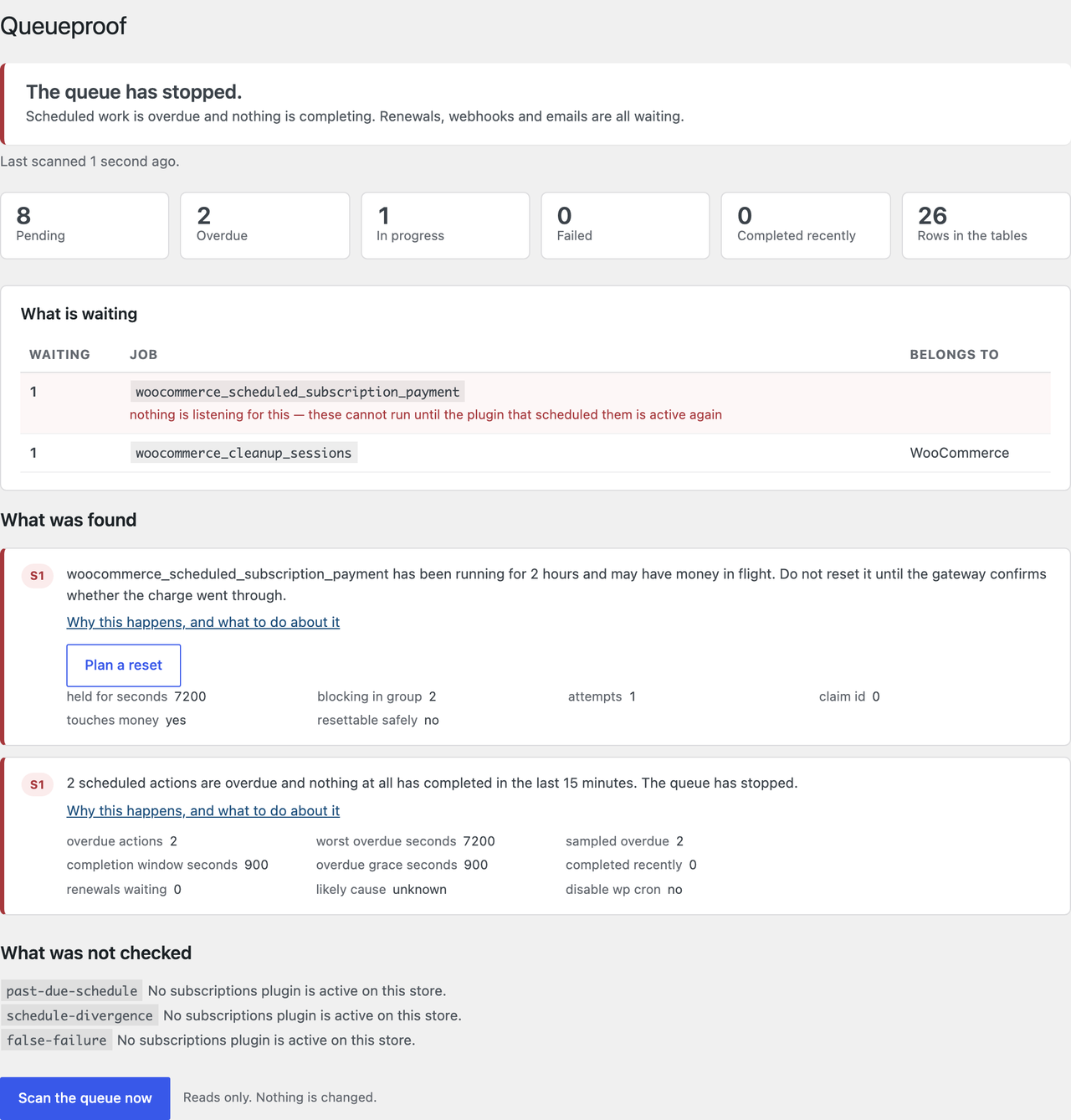
Real output from a live test store, not a mock-up.
How it works
WooCommerce already knows. It just does not tell you what to do.
If the queue has been stopped long enough, WooCommerce eventually shows you a line like “Action Scheduler: 848 past-due actions found; something may be wrong.” That is the whole message. It does not say which job, which plugin, why, or whether it is safe to do anything about it.
Today
- A fatal in another plugin, a PHP timeout mid-batch, or a blocked request stops the worker.
- Renewals sit as pending rows. Subscriptions still read Active.
- Nobody is emailed, because the thing that sends the email is also in the queue.
- You find out days later, from the one customer who noticed.
With Queueproof
- It reads the queue hourly — counts from the whole table, never a sample.
- It says one of three things: running, stopped, or it could not tell and why.
- The backlog arrives broken down by job, with the plugin each one belongs to.
- You get an email the first time something new and urgent appears, not every hour after.
The checks
Seven questions, asked every hour
Each one corresponds to a failure that has actually happened on real stores, and each links to a written explanation of what causes it.
- The runner has stopped
- Overdue work and nothing completing. A draining backlog is healthy.
- Site cannot reach itself
- The queue starts with a request your site makes to itself. A firewall ends it.
- Action stuck mid-payment
- A job that claimed a renewal and never finished, blocking its whole group.
- Renewal due, nothing ran
- And whether the queue stopped or just this one action went missing.
- A failure that succeeded
- Trial-end actions get marked failed after doing the work. Nothing is wrong.
- Two schedules disagreeing
- After an HPOS migration. Whichever is read decides if a renewal happens.
- Tables outgrowing cleanup
- The thirty-day purge stops keeping up, and nothing says so.
The arithmetic
What three days of silence costs a subscription store
One worked example, on numbers you can replace with your own. Nothing here is an industry average, because the honest answer to “how often does this happen” is below.
Active monthly subscriptions
600≈ 20 a day
Each bills on its own anniversary, so they spread evenly across the month. 600 ÷ 30.
Stops Friday, found Monday
3days
The ordinary case, because nobody is watching the queue at the weekend.
Renewals not collected
$1,74060 × $29
Sitting as pending rows in a database table instead of arriving in your account.
That $1,740 is delayed, not lost — most of it collects once the queue moves again. What is actually lost is the part nobody can put a number on: the cards that expire during the gap, the customers who notice and cancel, and the hours spent working out which sixty people to email. Anyone quoting you a churn figure for this has invented it.
And there is no published rate for how often Action Scheduler stalls. It depends on your host, your plugins and your traffic, and a number made up for a sales page would be worth nothing. That is the argument for a free monitor rather than a paid prediction: you do not need to know the odds if you find out the same hour.
The paid half
It asks your gateway before it touches anything that moves money
An action stuck on a payment hook died somewhere between charging the card and recording it. The row looks identical whether the money moved or not, and only Stripe can tell you which — so it is asked, at the moment you press the button, not when the scan ran.
Four answers, and two of them are “no”
If the charge never happened, the claim is released and a worker runs it again. If it did happen, the action is marked failed rather than re-run, so the customer is not billed twice and the queue still unblocks. If no gateway can answer, or the gateway answers unclearly, nothing is touched at all — an unclear answer is not a no.
Told before you look
An hourly scan, and an email the first time something new and urgent turns up — at most once every six hours, and never a repeat of yesterday's. Scheduled on WP-Cron, deliberately not on the queue it watches.
Housekeeping that refuses more than it accepts
Clearing old history will not touch anything pending, anything in progress, anything that failed, or anything named in the findings on your screen. A failure is the most useful row in the table.
It will not run a renewal for you
WooCommerce already has that button. What it does not do is check whether the card was charged already.
Asked at the moment, not at the scan
A finding can be an hour old. The gateway is re-asked when you press the button.
Dry run by default
Every repair shows you what it would do, in its own words, before it does anything.
Before you install anything
Four things you can check yourself
- Free forever, no card. All seven checks, every scan, the backlog named by job and plugin.
- A check that could not run is never a pass. Each scan lists what it could not look at, and why.
- Diagnosis never changes anything. Every check is a pure function of what it read.
- No bulk repair, ever. One item at a time, dry run first, re-verified against your gateway as it runs.
Pricing
The diagnosis is free. You pay to be told, and to repair.
All seven checks, the backlog named by job and plugin, and every scan — on the free plan, forever. What you pay for is being told without looking, and for repairs that ask your gateway first.
Free
$0
- All seven checks
- The backlog by job, with the plugin named
- Jobs nothing is listening for, called out
- Scan by hand, any time
- Read-only, always
Solo
$1916/mo
- One site
- Hourly scan, and the email
- Gateway-verified repair
- The renewal check before you re-run one
- History purging that spares anything useful
Questions
The ones worth answering
Is this not what WP Crontrol does?
No, and the difference matters. WP Crontrol manages WP-Cron, which is WordPress's own scheduler. Action Scheduler is a separate queue, with its own database tables, and it is the one your renewals actually run on. Queueproof reads WP-Cron only to answer “is anything starting the queue”.
I already have a plugin that cleans up Action Scheduler.
Those delete completed rows to shrink your database, which is useful housekeeping and does nothing at all for work that is stuck. If you are here because of the past-due warning, a cleaner will not help you.
Will it change anything on my store?
Not unless you ask it to, twice. Diagnosis is read-only and free forever. Repairs are a paid feature, a dry run is the default, and anything that could move money is re-verified against your gateway at the moment it runs rather than at the moment the scan happened.
Do I need WooCommerce Subscriptions?
No. Four of the seven checks work on any WooCommerce store, because Action Scheduler runs webhooks, emails and stock syncs too. The three that need a subscriptions layer decline politely rather than reporting your store clean — and they work with the layer WooPayments bundles, not only the paid plugin.
What happens if a check cannot run?
It says so, on the screen, below the findings and impossible to mistake for one. A check that could not look is not evidence that your store is fine, and reporting it as a pass is the one thing this plugin must never do.
Does the monitor depend on the queue it is monitoring?
It must not, and it does not. The hourly scan is a WP-Cron event, because a scan scheduled on Action Scheduler would stall along with everything else and go quiet exactly when there was something to say. The honest limit is that WP-Cron can be broken too — so the screen names that configuration the moment you do look.
What the first minute looks like
Activate it and open WooCommerce → Queueproof. It scans once, immediately, and tells you one of three things: the queue is running, the queue has stopped, or it could not tell and why. If there is a backlog you get it broken down by job with the owning plugin named, and if something is stuck you get the money that is waiting behind it. Nothing has been changed, and nothing will be until you decide.