Pine Script v6 · for TradingView
Pine Script that decides on closed bars, with the tests to prove it
Free TradingView indicators with public source you can read line by line, and custom Pine Script v6 work built the same way. Every signal is decided on a closed bar, every script is tested bar by bar against an independent reference, and each one works on the free Basic plan: copy, paste into the Pine Editor, add to chart.
- Closed bars only0 of 292,776 values changed on replay
- Tested bar by bar0 mismatches on 60,000 bars
- Any TradingView planBasic included, nothing to unlock
- Full source on GitHubRules, reference and tests
Indicators
Each free script is a complete tool, not a demo. The paid edition adds analysis on top; the free one never expires and never nags.
-
Candlestick Signal Alerts
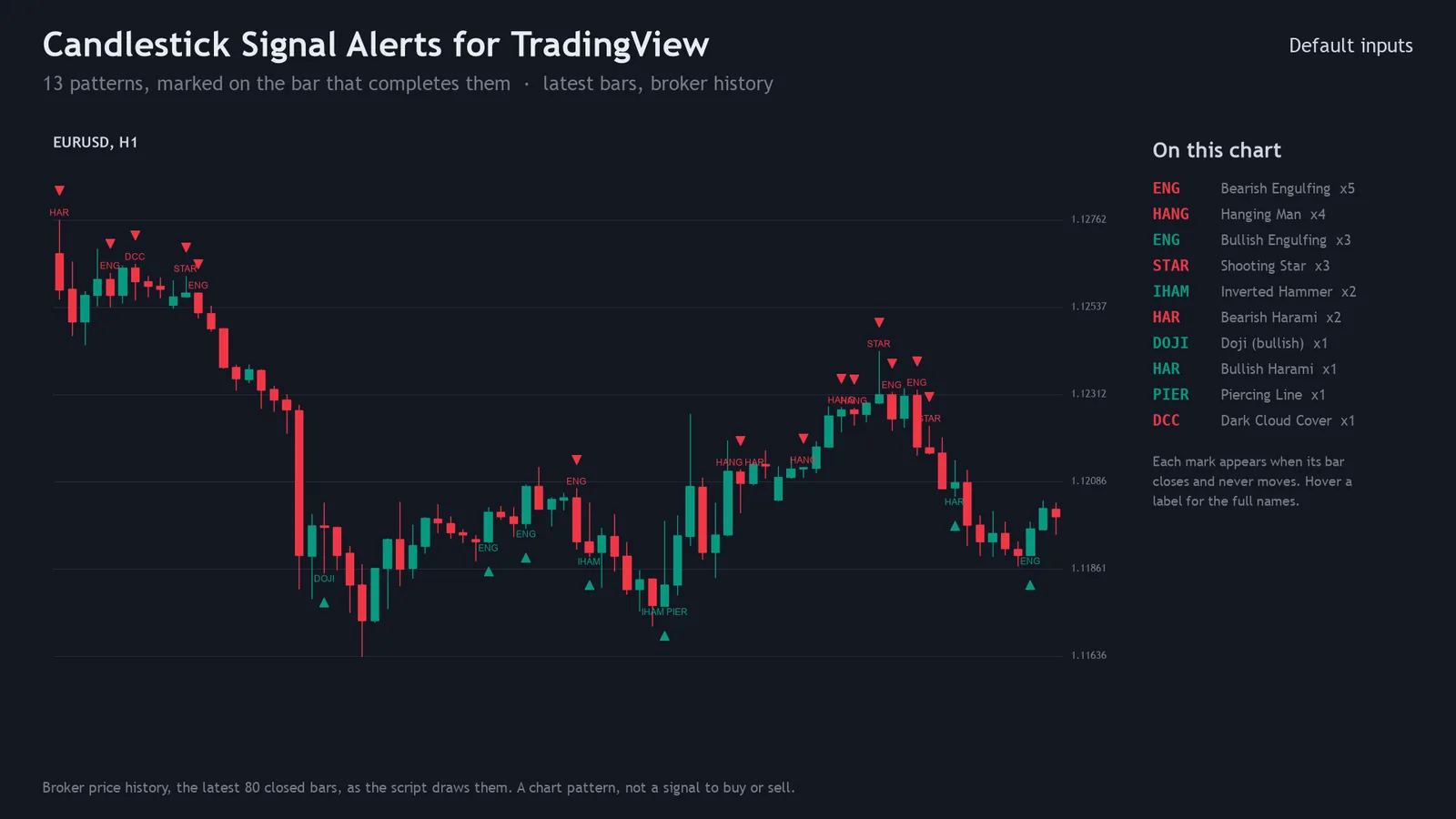
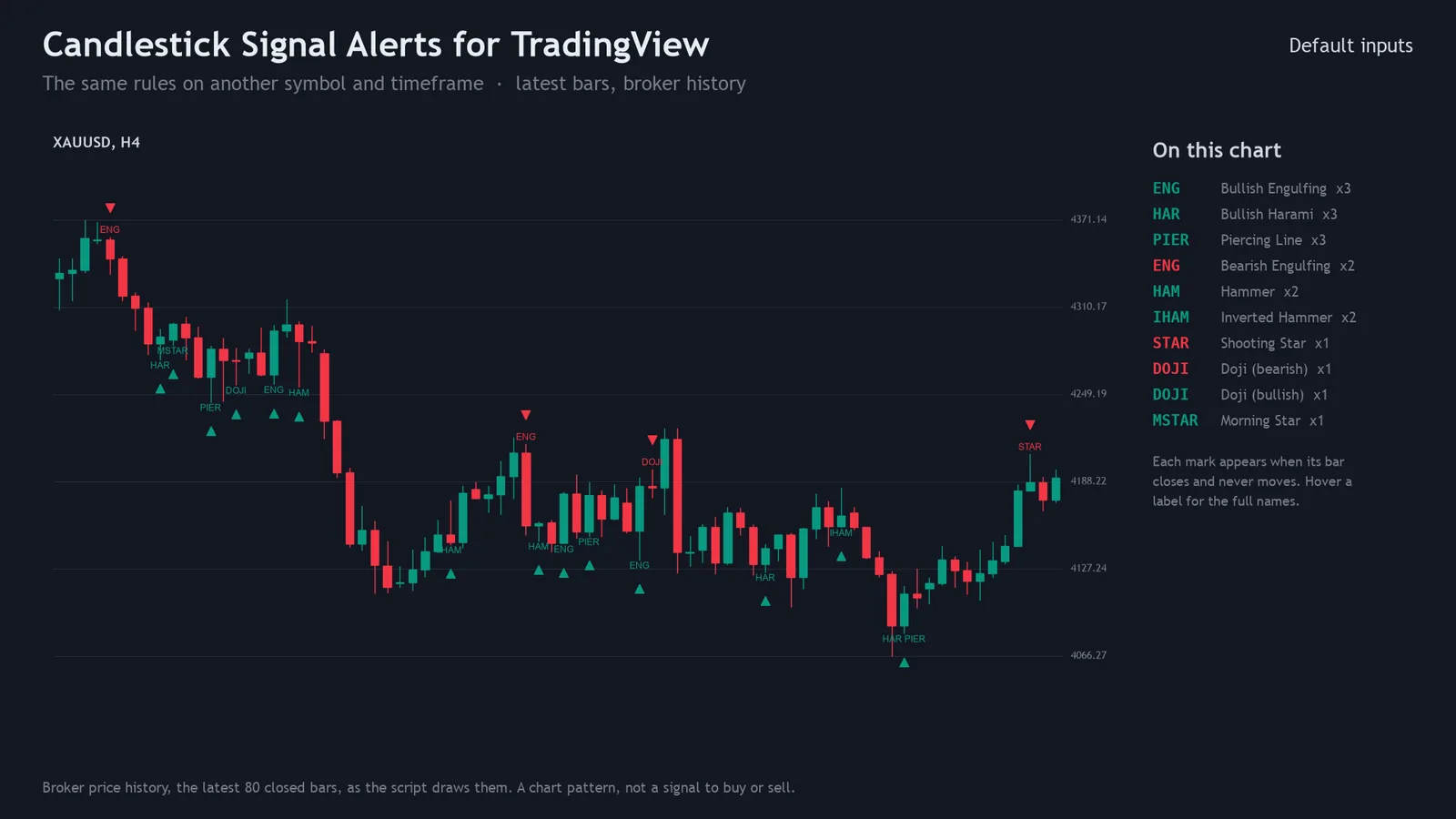
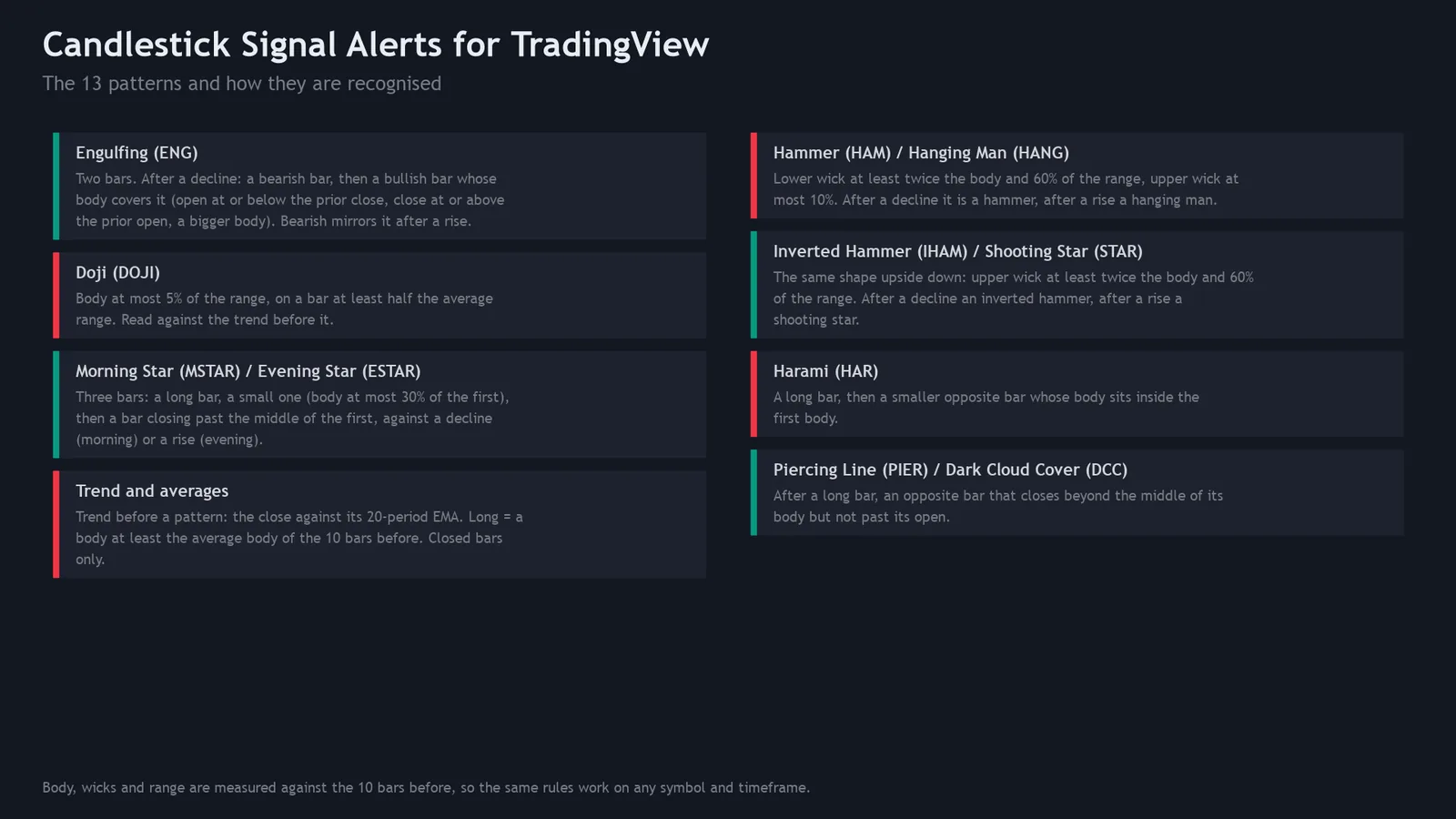
FREEPine v6Public source13 classic candlestick patterns, each found by a fixed rule you can read, marked with an arrow and a short label on the bar that completes it.
- Engulfing, hammer and hanging man, inverted hammer and shooting star, doji, morning and evening star, harami, piercing line and dark cloud cover
- One alert per closed bar that names every pattern, plus bullish and bearish conditions
- Seven switches to cut the noise; TradingView's own colours
-

Candlestick Pro
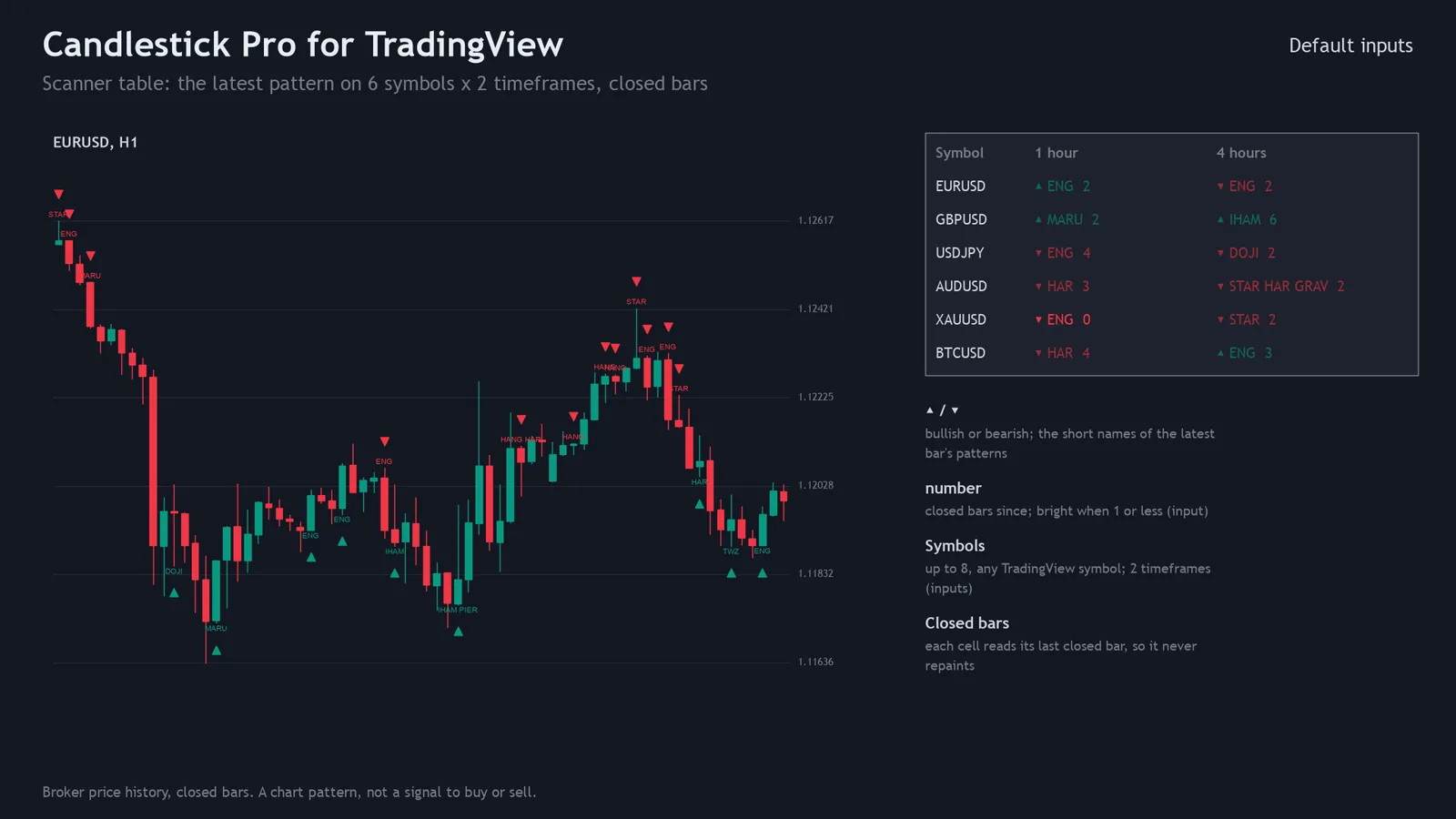
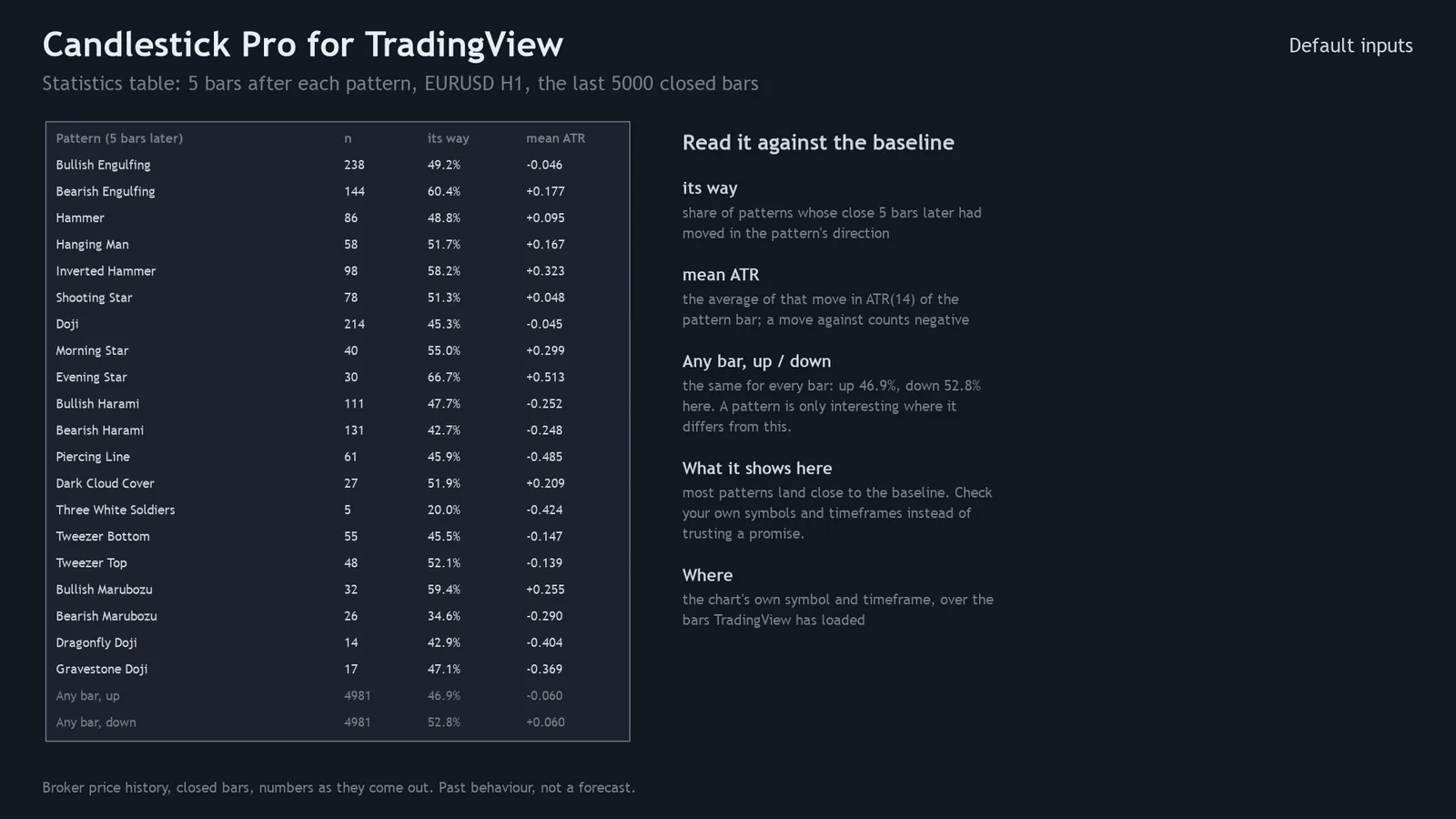
PROCOMING SOONEverything in the free script, plus the questions a pattern alone can't answer: is it at an extreme, and did it ever mean anything on this chart?
- 21 patterns: adds three soldiers and crows, tweezers, marubozu, dragonfly and gravestone doji
- Context filter: only patterns at the low or high of the last N bars
- Statistics table: what price did after each pattern, next to any bar
- Scanner table: latest pattern on up to 8 symbols in 2 timeframes
-
Harmonic Signal Alerts
FREEPine v6Public sourceABCD, Gartley and Bat patterns from confirmed swing points, drawn with their reversal zone and marked on the closed bar that reaches it.
- XABCD lines, reversal zone box, point labels and an arrow
- Alerts on the closed bar that reaches the zone
- Fibonacci ratio tolerance you can tighten
-
Harmonic Pro
PROCOMING SOONEverything in the free script, for eight patterns, plus patterns still forming and what happened after past ones.
- 8 patterns: adds Alt Bat, Butterfly, Crab, Deep Crab, Cypher
- Forming patterns near their zone, with an alert
- Outcome table with an adjustable stop
- Scanner table: up to 8 symbols in 2 timeframes
-
Divergence Signal Alerts
FREEPine v6Public sourceRSI and MACD-histogram divergence, regular and hidden, between two confirmed price pivots, with a line and an arrow on the bar that confirmed it.
- Regular and hidden divergence, bullish and bearish
- Option: only when RSI and MACD both diverge
- One alert per confirmed divergence
-
Divergence Pro
PROCOMING SOONDivergence on five oscillators at once, and how many of them agree at the same two pivots.
- Adds Stochastic, CCI and OBV to RSI and MACD
- Agreement count, with separate minimums to show and to alert
- Scanner table: up to 8 symbols in 2 timeframes
-
Sequential Countdown
FREEPine v6Public sourceThe 9-13 sequential count on closed bars: setup numbers 1-9 and countdown numbers 1-13.
- Perfected 9 shown as 9, otherwise 9'
- Countdown 1-13, with + on a deferred bar
- Alerts on 9 and 13
-
Sequential Pro
PROCOMING SOONThe same count, plus the levels the setups leave behind and a one-bar-early warning.
- Resistance and support of the latest setups
- Alerts at 8 and 12 as well as 9 and 13
- Scanner table: up to 8 symbols in 2 timeframes
-
Gann HiLo Swing
FREEPine v6Public sourceThe HiLo Activator line and a 2-bar swing line through confirmed swing highs and lows, on closed bars only.
- HiLo Activator: blue in an uptrend, red in a downtrend
- Dotted swing line through confirmed pivots
- Arrow and alert on each new trend
-
Gann Toolkit Pro
PROCOMING SOONGann's price and time tools anchored to the swings the engine confirms. Levels, not signals.
- Square of 9 levels, Gann fan and Gann box
- Alert when a bar closes across a level
- Trend table: up to 8 symbols in 3 timeframes
-
SMC Zones
FREEPine v6Public sourceOrder blocks, fair value gaps, BOS / CHoCH structure breaks and optional liquidity sweeps, all decided on closed bars.
- Zones drawn as boxes until price mitigates them
- Structure breaks as dotted lines, sweeps as marks
- Optional session-hours filter and higher-timeframe zones
-
Session Levels
FREEPine v6Public sourceAsia, London and New York sessions as boxes, plus previous day and week high/low and today's open, in New York time.
- Session boxes with their high and low
- Previous day and week high/low, today's open
- Alerts on the first close beyond a level
-
SMC Session Pro
PROCOMING SOONThe SMC zones on your chart plus a scanner table of structure, sweeps, zones and session breaks across symbols.
- Scanner table: up to 8 symbols in 3 timeframes plus a session column
- Each cell says how many closed bars ago it happened
- Runs the same rules itself: no free script needed
-
Prior Day Breakout
FREEPine v6Public sourceStrategyA strategy() script for the Strategy Tester: the first close beyond the previous day's high or low, stop on the other side, target in R.
- Previous-day high and low drawn every day
- Fixed quantity, the validated target settings built in
- No request.security, so no lookahead
-
Prior Day Breakout Pro
PROCOMING SOONStrategyThe same breakout with the position management a real account needs.
- Position size from a risk % of equity
- Break-even, trailing stop and partial close
- Entry-time, weekday and Friday filters; JSON alert messages for webhooks
-
Risk Position Tool
FREEPine v6Public sourceClick an entry, a stop and a target: the lot size for your risk, the money at the stop and at the target, and the reward:risk.
- Risk as a % of the balance you type, or a fixed amount
- Lot step, minimum and maximum like your broker's
- Alert when price reaches the entry, stop or target
Add a script to TradingView in about a minute
Works on the web, desktop and mobile apps, on every plan including the free Basic plan. The script is saved to your own account.
- Copy the script
Open the
.pinefile on GitHub, click Raw, select all and copy. - Paste into the Pine Editor
On a chart, open the Pine Editor tab at the bottom, create a new indicator and replace its text with the code.
- Save, add to chart, set alerts
Click Save, then Add to chart. For alerts, right-click the chart, Add alert, and pick the indicator.
Tested, not just claimed
"Non-repainting" is easy to write. These are the checks that were run on the published code. Data: the latest 5,000 closed bars of EURUSD, GBPJPY, XAUUSD and BTCUSD on 15-minute, 1-hour and 4-hour charts (12 series, broker history). Prior Day Breakout was tested on its own markets: XAUEUR 1-hour and 15-minute, XAUUSD and EURUSD 1-hour.
| Free script | Same result as the Python reference | No repainting (closed-bar values changed on replay) |
|---|---|---|
| Candlestick Signal Alerts | 0 mismatches on 25,534 pattern bars | 0 of 292,776 changed |
| Harmonic Signal Alerts | 0 mismatches on 271 patterns | 0 of 878,328 changed |
| Divergence Signal Alerts | 0 mismatches on 1,133 divergences | 0 of 585,552 changed |
| Sequential Countdown | 0 mismatches: 1,568 nines, 379 thirteens | 0 of 585,552 changed |
| Gann HiLo Swing | 0 mismatches on 329,902 values | 0 of 1,171,104 changed |
| SMC Zones | 0 mismatches on 12,298 zones | 0 of 2,342,208 changed |
| Session Levels | 0 mismatches on 6,031 signals | 0 of 1,024,716 changed |
| Prior Day Breakout | 0 trade mismatches on 1,306 trades | 0 of 416,388 changed |
| Risk Position Tool | 0 mismatches in 48 sizing runs | not applicable |
Every script, free and Pro, compiles in TradingView's Pine v6 compiler with 0 errors and 0 warnings. Each was run in PineTS, an independent re-creation of the Pine runtime (not TradingView's engine), and compared with a separately written Python reference on every bar; the repaint check re-runs it on the data cut at three points. Multi-symbol scanner tables cannot run in PineTS and are compile-checked only. The test script and the Python reference are in each repository, so you can repeat the check on your own data. No profit or accuracy claim is made: a pattern, a divergence or a count describes past bars, nothing more.
Free vs Pro
Start free. Pro is for traders who want to know whether a pattern meant anything on their own symbols, and to watch several charts at once.
| Candlestick Signal Alerts | Candlestick Pro | |
|---|---|---|
| Price | Free | One-time price, 12 months of updates (coming soon) |
| Patterns | 13 | 21 |
| Arrows, labels, alerts | Yes | Yes |
| Only at the low or high of the last N bars | No | Yes |
| Statistics table vs any bar | No | Yes |
| Scanner: 8 symbols x 2 timeframes | No | Yes |
| Closed bars only, no repaint | Yes | Yes |
| Works on the free Basic plan | Yes | Yes |
| Source | Public on GitHub (non-commercial licence) | Delivered to you, personal-use licence |
Hire a Pine Script developer
Custom Pine Script indicators, strategies and alerts
I write Pine Script v6 to your rules and show you how each script was checked before you get it. Everything on this page, from the closed-bar logic to the bar-by-bar tests, is how your project is built too.
What I build
- Signal indicators that decide only on closed bars, with alerts that fire once per bar close
- Indicator to strategy conversions, with commission, slippage, margin and sizing set to realistic values
- Alerts and webhook JSON in the exact format your bridge documents (TradersPost, PickMyTrade, PineConnector, your own server)
- Multi-symbol and multi-timeframe scanner tables within TradingView's request limits
- v4 / v5 to v6 migration, handling the v6 changes that silently alter results
- Repainting and backtest review of a script you already own, with a written report
- Pine to MetaTrader and back: the same rules as an MT4/MT5 indicator or EA (my MetaTrader work)
What you get
- The full source, and you own it once it is paid for. It is written for you and not resold
- A written spec first: bar-close or intrabar decisions, timeframes, inputs, alert text, edge cases
- A test pack: compile result, comparison with a reference, repaint check, and for strategies a cost-sensitivity table
- Fixed price per milestone, quoted after the spec. Changes of scope are quoted, never quietly absorbed
- 30 days of free bug fixes against the agreed spec
- Your strategy stays private; I sign an NDA on request
What I won't do
- Promise accuracy, win rates or profit. I build to your rules; I don't certify that they make money
- Hide repainting or look-ahead to make a backtest look better
- Copy or unlock another author's protected script
- BriefYour rules in plain words, the symbols and timeframes, how alerts should reach you.
- Spec and quoteA one-page spec back, with every rule written out and a fixed price per milestone.
- ReferenceWhere the rules can be checked, I write them a second time, separately, in Python.
- Build and comparePine v6 code, compared with the reference on real bars until they agree on every bar.
- HandoverSource, input notes, the test pack, then 30 days of fixes.
How I build and test Pine scripts
Every point below can be checked in the public repository. It is the same process for client work.
- 1. Decisions on closed bars
Signals are computed when
barstate.isconfirmedis true and alerts usealert.freq_once_per_bar_close. A signal can't appear mid-bar and vanish at the close. The cost is one bar of delay, and I say so. - 2. A repaint test, not a repaint claim
The script is re-run on the same data cut at three points; every bar before each cut must read exactly as in the full run. Result here: 0 of 292,776 closed-bar values changed.
- 3. A second, independent implementation
The rules are written again in Python and the Pine output is compared with it on every bar, for several input sets. Result here: 0 mismatches on 25,534 pattern bars across 12 series.
- 4. Higher timeframes without look-ahead
A
request.securitycall withlookahead_ononly gives confirmed values when the requested expression is offset by[1]. My scanner requestsvalue[1]withlookahead_on, TradingView's documented non-repainting form. - 5. Limits designed in
TradingView allows 40 unique
request.*()calls (64 on Ultimate), shows 50 labels unless raised (500 max), and caps execution at 20 s on Basic. A 16-cell scanner fits the budget on every plan. - 6. Code that reads like the style guide
Licence and
//@version=6first, then constants, inputs with tooltips, documented functions (//@function,//@param), calculations, plots and alerts last. camelCase names, SNAKE_CASE constants. - 7. Floating-point care
Ratio rules compare with a tolerance of
1e-9 × price, so rounding noise on an exact tie can't decide a signal. Integer maths is explicit, because v6 changed what5 / 2returns. - 8. Honest statistics
When a script reports what happened after a signal, it shows the same measure for any bar next to it. A pattern only matters where it differs from that baseline, and I publish the results when it doesn't.
Anatomy of a closed-bar signal
Trimmed from the free script. Three lines carry the closed-bar behaviour:
closed: nothing is drawn or sent until TradingView confirms the bar has closed.bullNow/bearNow: the pattern masks only count on that confirmed bar.alert.freq_once_per_bar_close: one message per bar, after the close, naming every pattern.
// Only a closed bar counts: on the live bar nothing
// is drawn or alerted until it closes.
bool closed  = barstate.isconfirmed
bool bullNow = closed and bullMask > 0
bool bearNow = closed and bearMask > 0

plotshape(bullNow, "Bullish pattern", shape.triangleup,
     location.belowbar, bullColor, size = size.tiny)

if bullNow or bearNow
    string msg = syminfo.ticker + " " + timeframe.period + ": "
    if bullNow
        msg += "bullish " + maskNames(bullMask, PATTERN_NAMES, ", ")
    alert(msg, alert.freq_once_per_bar_close)
Known limits of my testing. PineTS is an independent re-creation of the Pine runtime, not TradingView's engine. That is why every script is also compiled by TradingView's own compiler (0 errors, 0 warnings) and checked on a TradingView chart before release. PineTS can't load other symbols, so multi-symbol tables are only checked on TradingView itself. It also rounds re-assigned values to 10 decimals, so sums are compared within 1e-4 while counts must match exactly.
Pine Script v6: technical notes
The details that separate a script that works on the chart from one that also works live. Each note links to the section of TradingView's Pine Script manual it comes from.
Repainting: what it is and how to stop it
TradingView defines repainting as script behaviour that makes historical and realtime calculations differ. Three causes matter in practice:
- Unconfirmed realtime values. On the live bar the script runs on every tick, so a condition can be true mid-bar and false at the close. Fix: decide on
barstate.isconfirmed, which is true only on the bar's closing update and reproduces exactly on historical bars. - Future data from another timeframe.
request.security(..., expr, lookahead = barmerge.lookahead_on)on a non-offset expression returns values historical bars could not have known. Safe form: requestexpr[1]withlookahead_on. The two only work together. - Plotting into the past with negative offsets or labels moved back after the fact.
Data-feed revisions and a moving first chart bar are unavoidable, so "no repainting" claims should name their scope. Source: Repainting
The execution model: historical vs realtime bars
- The script runs once per bar from the first bar to the last. On historical bars an indicator runs once, at the close; on the open realtime bar it runs again on every tick.
- Before each new tick the runtime rolls back the bar's variables to their last committed state.
varsurvives across bars but is rolled back between ticks;varipsurvives ticks too, so it cannot be reproduced on history and cannot be backtested. - Strategies run once per bar at the close by default.
calc_on_every_tickmakes realtime behave differently from the backtest. - Most series keep 5,000 bars of history (open, high, low, close and time keep 10,000). The runtime sizes buffers from the first bars;
max_bars_backis only for when it can't work out the look-back.
Limits every script has to fit
| Limit | Value |
|---|---|
| Total execution time | 20 s on Basic, 40 s on other plans |
| One loop, per bar | 500 ms |
Unique request.*() calls | 40 (64 on Ultimate) |
| Tuple elements across requests | 127 |
| Plots | 64 |
| Labels, lines, boxes shown | 50 by default, up to 500 |
| Tables | 9 |
| Compiled tokens | 100,256 |
| Collection elements / map pairs | 100,000 / 50,000 |
| Strategy orders in a backtest | 9,000 (1,000,000 with Deep Backtesting) |
| Chart bars | 5,000 on Basic up to 40,000 on Ultimate |
request.security, used correctly
- The expression is evaluated in the requested context:
request.security(sym, "240", ta.sma(close, 20))is a 20-bar SMA on 4-hour bars, not on chart bars. - On realtime bars the call returns the current, unconfirmed value of the higher timeframe. That is why the
[1]offset withlookahead_onis the non-repainting form. - Several values from the same symbol and timeframe should come back as one tuple. Each unique call counts against the 40-call budget, and all tuples share 127 elements.
ignore_invalid_symbol = truereturnsnafor a symbol your feed doesn't have, instead of stopping the script.- v6 allows dynamic requests (series arguments, calls inside loops), but every dataset must already be requested on historical bars.
Strategies: why backtests flatter, and the fixes
- The broker emulator fills market orders at the next bar's open by default. Inside a bar it assumes a path (open→high→low→close if the open is nearer the high), so a stop and a target in the same bar can be filled in the wrong order.
- With no
commission_type,commission_valueorslippage, a strategy trades for free. I always set them, then raise them to see whether the result survives. process_orders_on_closefills on the signal bar's close;calc_on_order_fillscan mislead because historical highs and lows are already final.- v6 defaults
margin_long/margin_shortto 100. TradingView's publishing rules call a margin of 0 never acceptable and ask for enough trades (normally over 100) for results to mean anything. - Heikin Ashi, Renko and other non-standard charts give unrealistic strategy fills. Signals should be computed on standard candles.
Alerts and webhooks
alert()builds its message at runtime and sets its own frequency;alertcondition()is for indicators only, takes a constant message and is chosen in the alert dialog.- A script never runs an alert by itself: you create it in Create Alert, and TradingView saves a copy of the script and inputs at that moment. After a code change, delete the alert and create it again.
- Webhooks: valid JSON is sent as
application/json, only ports 80 and 443, the server must answer within 3 seconds, and the account needs 2FA. Never put API keys in the message. - Strategy placeholders such as
{{strategy.order.action}}and{{strategy.order.contracts}}fill in the order details. Each bridge expects its own field names, so I follow its documentation.
Moving from v5 to v6: the changes that bite
- Booleans can't be
na: what was a booleannais nowfalse, and ints/floats no longer cast to bool implicitly. and/orare lazy: ata.rsi()call inside the second operand may not run on every bar. Move history-dependent calls out of conditions.- Integer division returns fractions:
5 / 2is 2.5. Wrap it inint()or usemath.floor()where a whole number is meant. forloops re-evaluate their end value each iteration;whenis gone fromstrategy.*();timeframe.periodalways has a multiplier ("1D", not "D");transpis removed.- Dynamic requests are on by default.
8 questions to ask any Pine Script developer
Ask them before you pay anyone, me included. The answers show quickly who understands the platform.
- Do signals and alerts wait for the bar to close, and what does that cost in delay?
- Is every
request.securitycall eitherlookahead_offor offset by[1]? - Does the backtest charge commission and slippage, and is margin above 0?
- What happens on the realtime bar that doesn't happen on historical ones?
- How is the alert message built, and who checks the JSON against my bridge?
- How will you show me the script does what my rules say: a reference, a test, or only screenshots?
- Who owns the code, and what is fixed for free after delivery?
- What did you not test?
Questions
Are these Pine Script indicators free?
Yes. The nine free scripts on this page have their full source on GitHub (PolyForm Noncommercial licence: source-available, free for non-commercial use). Each Pro edition is a separate paid script, coming soon; you do not need it to use the free one.
Do they work on the free TradingView Basic plan?
Yes. You add the script from its source in the Pine Editor, which every plan has. Basic limits how many indicators and alerts you can run at once, not which scripts you can add.
Do the indicators repaint?
No. Every mark and alert is decided on a closed bar (barstate.isconfirmed) from that bar and earlier ones only, and alerts fire once per bar close. Re-running the script on data cut at three points changed 0 of 292,776 closed-bar values.
Why aren't they in TradingView's public library?
They are published on GitHub and here instead, with the full source, the Python reference and the tests next to the code, so anyone can read and check every rule. Adding one to your chart takes about a minute.
Can I get alerts on my phone?
Yes. Right-click the chart, choose Add alert, pick the indicator and either Any alert() function call (one message per closed bar naming every pattern) or Bullish pattern / Bearish pattern. TradingView delivers it as a pop-up, app notification, e-mail or webhook, depending on your plan.
Will a pattern tell me where price goes next?
No, and nothing here claims it does. In my own check, the moves after these patterns were close to what follows any bar. Candlestick Pro's statistics table exists so you can check your own symbols instead of trusting a promise.
How much does a custom Pine Script indicator or strategy cost?
It depends on scope: how many rules and inputs, indicator or strategy, how many symbols and timeframes, and how alerts must be delivered. You get a written spec first, then a fixed price per milestone. Scope changes are quoted, never quietly added.
Do I get the source code, and who owns it?
Yes. You receive the full Pine Script source and own it once it is paid for. It is written for you and not resold, your strategy stays private, and I sign an NDA on request. Bugs against the agreed spec are fixed free for 30 days.
Can you convert my indicator into a strategy, or an MT4/MT5 EA into Pine Script?
Yes. Indicator to strategy, Pine to MQL4/MQL5 and back, and v4/v5 to v6 migration. The same rules are compared bar by bar between both versions so the conversion can be checked, not just trusted.
Can a Pine Script alert place trades at my broker?
Not by itself. Pine creates alert events; TradingView sends them, for example as a webhook with a JSON message, to a bridge or server that places the order. I write the Pine side and the message in the format your bridge documents.
Is this site affiliated with TradingView?
No. These are independent scripts written in Pine Script, TradingView's scripting language. TradingView is a trademark of TradingView, Inc.
I use MetaTrader. Is there a version for MT4 or MT5?
Yes: the same rules ship as MetaTrader 4 and 5 indicators on the MQL5 Market. See MetaTrader products.