 Transferproof
WooCommerce · Bank transfer and Vorkasse
The money is in the bank. The order is still On hold.
WooCommerce puts every bank-transfer order On hold and waits. Then someone opens the bank account, finds the payment, works out which order it belongs to and changes the status by hand. Transferproof reads the statement your bank already gives you, matches each payment to its unpaid order, and tells you why. Nothing is marked paid until it balances.
| Amount | Payment text | Transferproof |
|---|---|---|
| 49.90 | Bestellung RF09 201 | Order #201, in full. The reference is #201's and its check digits are correct. |
| 30.00 | Anzahlung RF41 207 | Order #207, part payment. 50.00 still due; the order stays unpaid. |
| 25.00 | Danke | You choose. Orders #203 and #205 are both 25.00 and nothing says which. |
| 77.77 | Miete November | Unmatched. No unpaid order has this amount. |
The statement Transferproof's browser tests import on every run, on a test store. Nothing is written to an order until you open Apply, see exactly what it will do, and press it.
In WooCommerce
Every payment, the order it pays, and why
WooCommerce → Transferproof. Import the statement, and the Review tab lists each payment with its suggested order and the reason in a sentence. These are the real screens, on a test store.
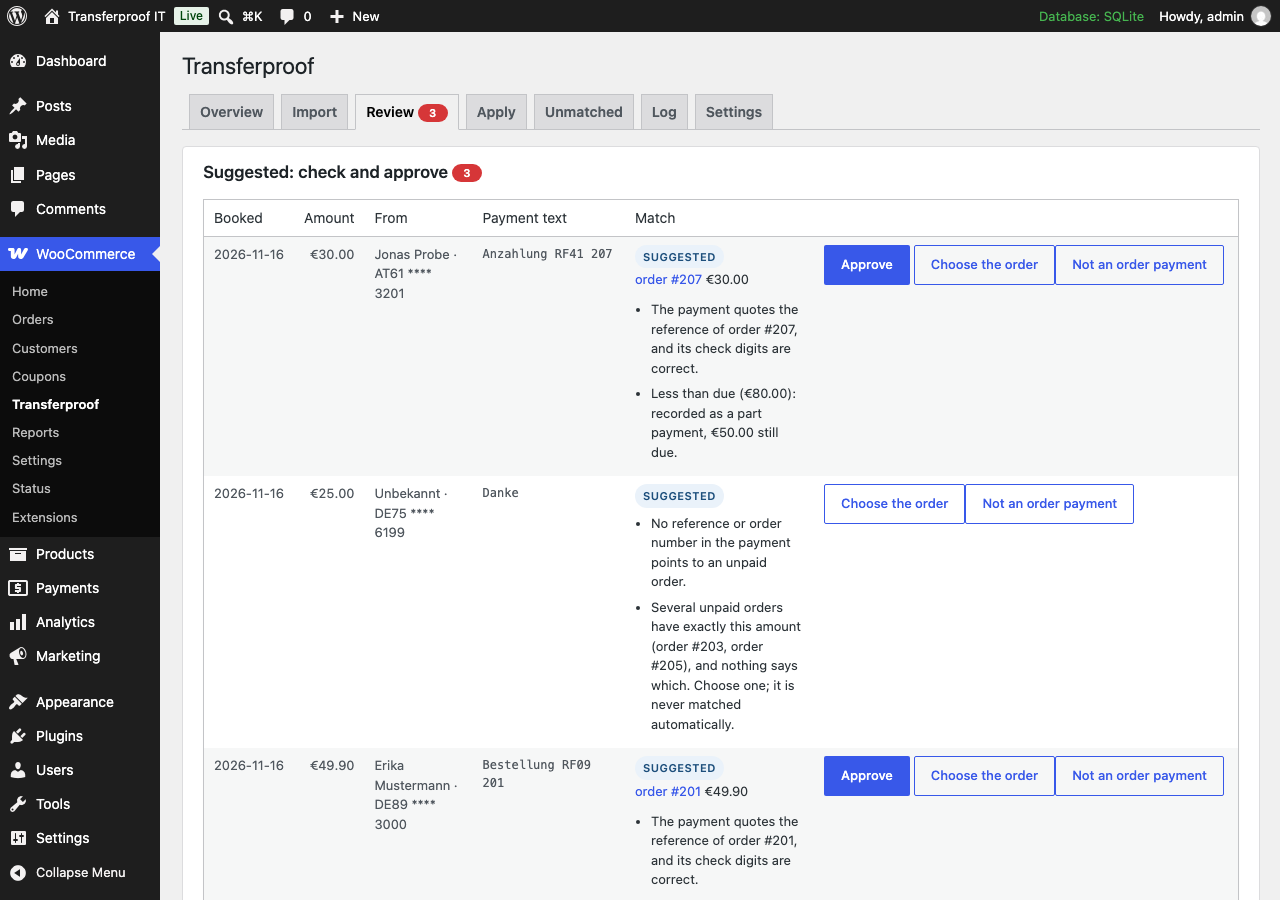
The payer's account number is never shown whole. Approving writes nothing yet; Apply does.
How it works
From the statement to a paid order, with you deciding
Most German, Austrian and Swiss banks give you a statement file in online banking: camt.053, MT940 or CSV. Transferproof reads that file on your server, then deletes it.
Today
- Customers pay by transfer, and some forget the order number or type it wrong.
- You open online banking and read the payments one by one.
- You search the orders for each amount and name, and guess when two look alike.
- You change each order to Processing by hand, and hope nobody paid twice.
With Transferproof
- Each order gets a payment reference with check digits, shown to the customer with a QR code that fills in the transfer.
- You download the statement and import it. Each payment is matched by reference, order number or amount, and says why.
- You approve, choose between look-alikes, or set a payment aside as not an order.
- Apply shows exactly what will happen to each order, then marks them paid as a payment gateway would. Every step is logged and can be undone.
The arithmetic
What matching by hand costs a bank-transfer store
One worked example, on numbers you can replace with your own. It is an illustration, not an industry average.
Bank-transfer orders
300a month
A store where Vorkasse is a fifth of 1,500 orders.
Finding, checking and marking each one
2minutes
Read the payment, search the order, compare, change the status.
Spent matching
10hours a month
300 × 2 minutes. And the orders wait for it before they ship.
The expensive mistake is not the time. It is the order marked paid that was not, because two customers sent the same amount. Transferproof never decides that one: a payment that names no order and fits more than one is always a question for you.
What it will and will not do
Nothing is marked paid until it balances
Marking an order paid releases the goods. So the defaults are the cautious ones, and the cautious answer is always “ask”.
See it before it happens
Approving a payment writes nothing. The Apply tab lists exactly what will happen to each order, checked against your orders as they are at that moment, and if anything changed after you looked, Apply refuses and asks you to look again.
Never paid on a guess
Two unpaid orders for the same amount and a payment that names neither is a choice you make. Automatic matching is off when you install it, and even on it applies only payments that quote the reference or order number and pay exactly what is due.
Undo, properly
Undo puts the order back as it was, paid date and transaction id included, so your reports stop counting it. It says first what it will and will not do.
References with check digits
An RF creditor reference built from the order number. A mistyped digit is caught, not matched to the wrong order.
Part and split payments
A part payment is recorded with what is still due. One transfer that pays several orders exactly is split between them.
Your statement stays yours
No bank login, no third party, no per-match fee. The file is read on your server and deleted; payer accounts are stored masked.
For your customers
The reference, where they will see it
On the thank-you page, in the order emails and on the order in My Account, with a GiroCode that fills in the transfer in a banking app, amount and reference included.
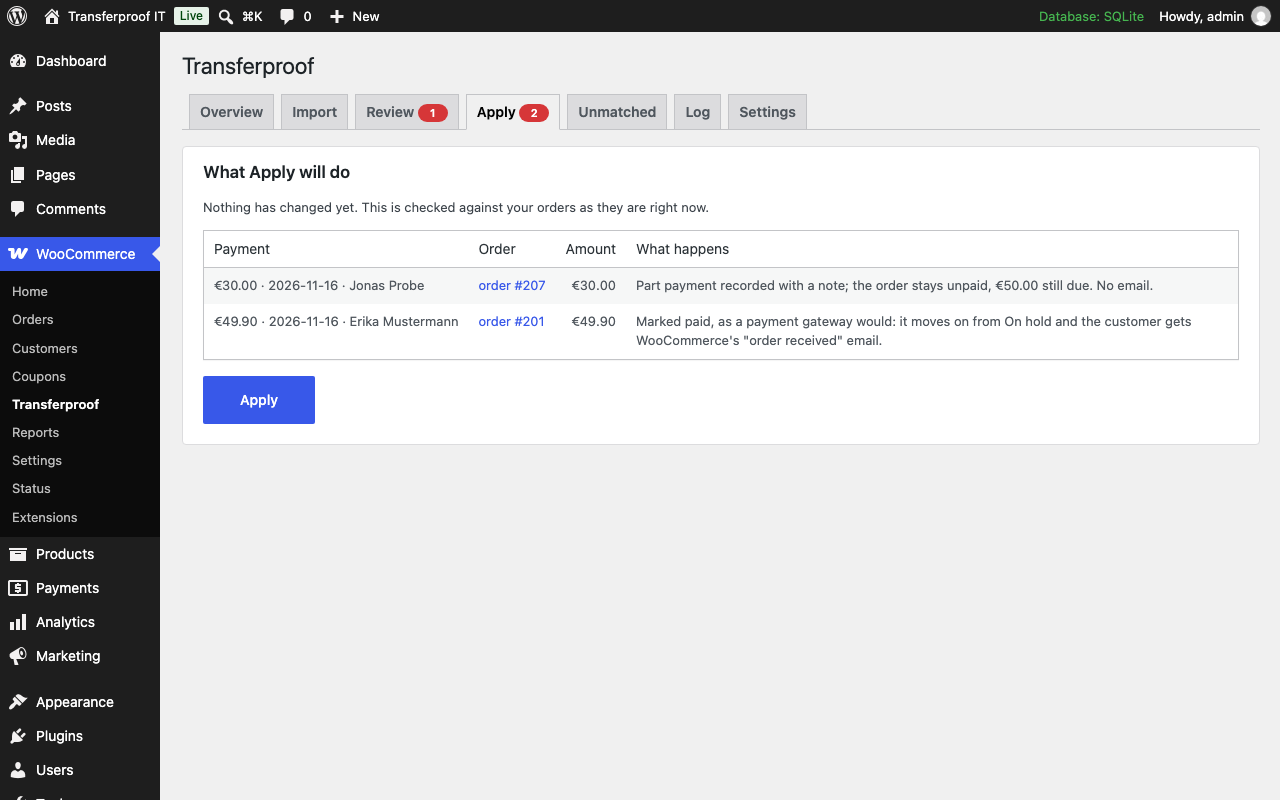
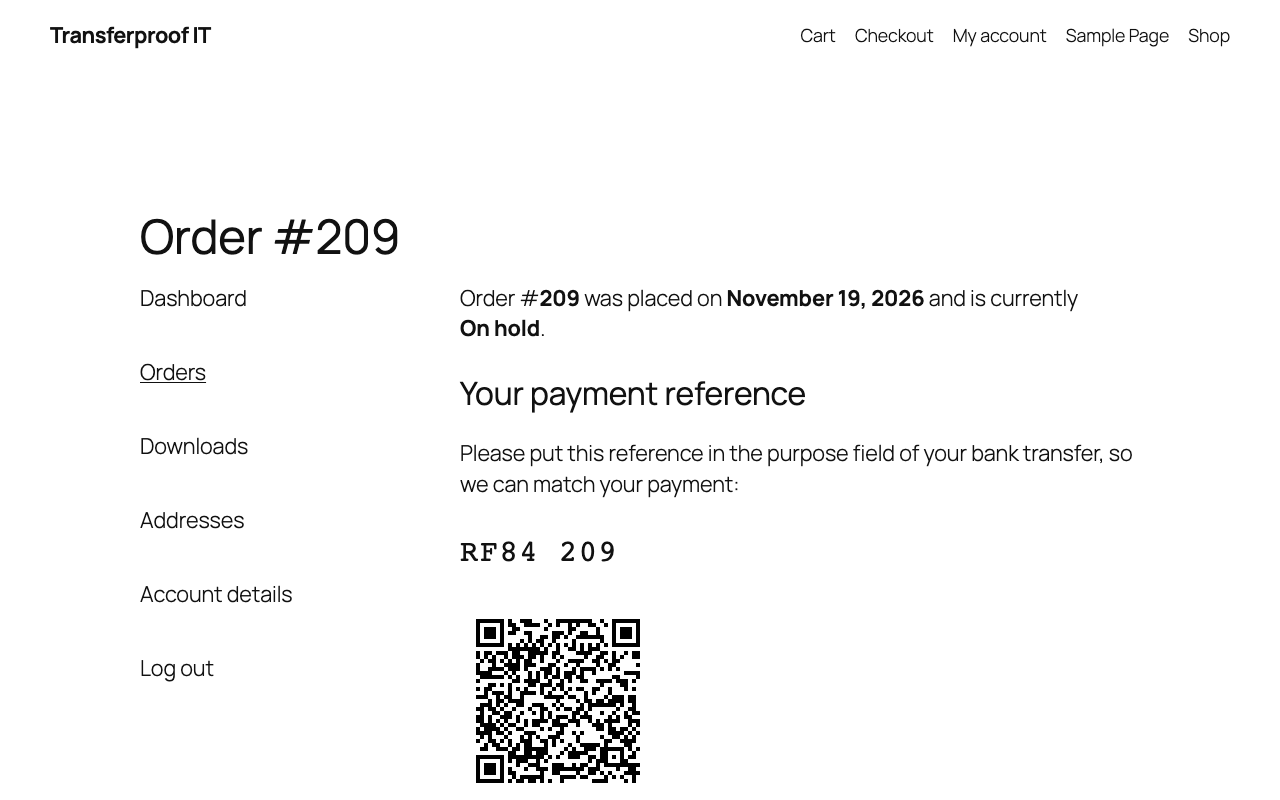
Left: Apply, before anything is written. Right: what the customer sees on an unpaid order. The QR code is drawn on your server, for euro orders.
The first version
What it reads, and what it refuses
A file it cannot read with certainty is refused, with the reason in words, rather than read wrongly.
Reads
- camt.053, versions .02, .04 and .08: the German banking standard since November 2026 offers .08
- MT940, including the structured German payment text
- CSV from Sparkasse, ING Deutschland, DKB and N26, recognised by their columns
- CSV from Deutsche Bank / Postbank, Commerzbank, PostFinance and Wise, which you confirm on the first import
- Any other bank's CSV, after you say once which column is which
- Orders paid by Direct bank transfer, and pay-later invoice orders that may already have shipped
- HPOS and the older order storage
- In English and German: every screen, message and customer text follows your site language
Refuses
- Intraday reports and notifications (camt.052, camt.054, MT942): they would count payments twice
- A CSV whose amounts or dates could be read two ways: both readings are shown and you pick
- PDF statements, OFX and QIF
- Reversed and returned payments: held for review or skipped, never matched
- Matching across currencies: a payment only pays orders in its own currency
- Bank logins of any kind: it reads the file you download
Field notes
The problems behind it, with a script you can run without the plugin
Each note explains one part of matching bank transfers, with a read-only Python or Node.js check you can run on your own store or statement file.
- Why bank-transfer orders go unmatched · the payment arrived, but nothing ties it to an order
- camt.053 vs MT940 · which bank files are statements, and which double-count
- Same-amount transfers never auto-match · two orders for 25.00 and a payment that names neither
- One transfer pays several orders · part payments and finding the exact split
- RF reference check digits · a typo becomes invalid, not another order
Pricing
Fourteen days to clear your On hold orders.
Every plan starts with a 14-day trial and no card, and every plan has everything; they differ only in how many sites the licence covers. After the trial there is a 14-day money-back guarantee. Updates arrive in your WordPress dashboard while the licence is active, and the plugin is 100% GPL. If a trial or licence ends, Transferproof stops matching and shows no reference to customers; orders already marked paid stay paid, and your settings and log are kept.
Solo
$108/mo
- One site
- camt.053, MT940 and CSV import
- Matching by reference, order number and amount
- Part and split payments
- Dry run, Apply and undo
- The reference and GiroCode for customers
- Optional reminder and auto-cancel
- WP-CLI and the full log
US dollars. Annual billing: $99, $199 or $399 a year. Sold and delivered by Freemius, the reseller.
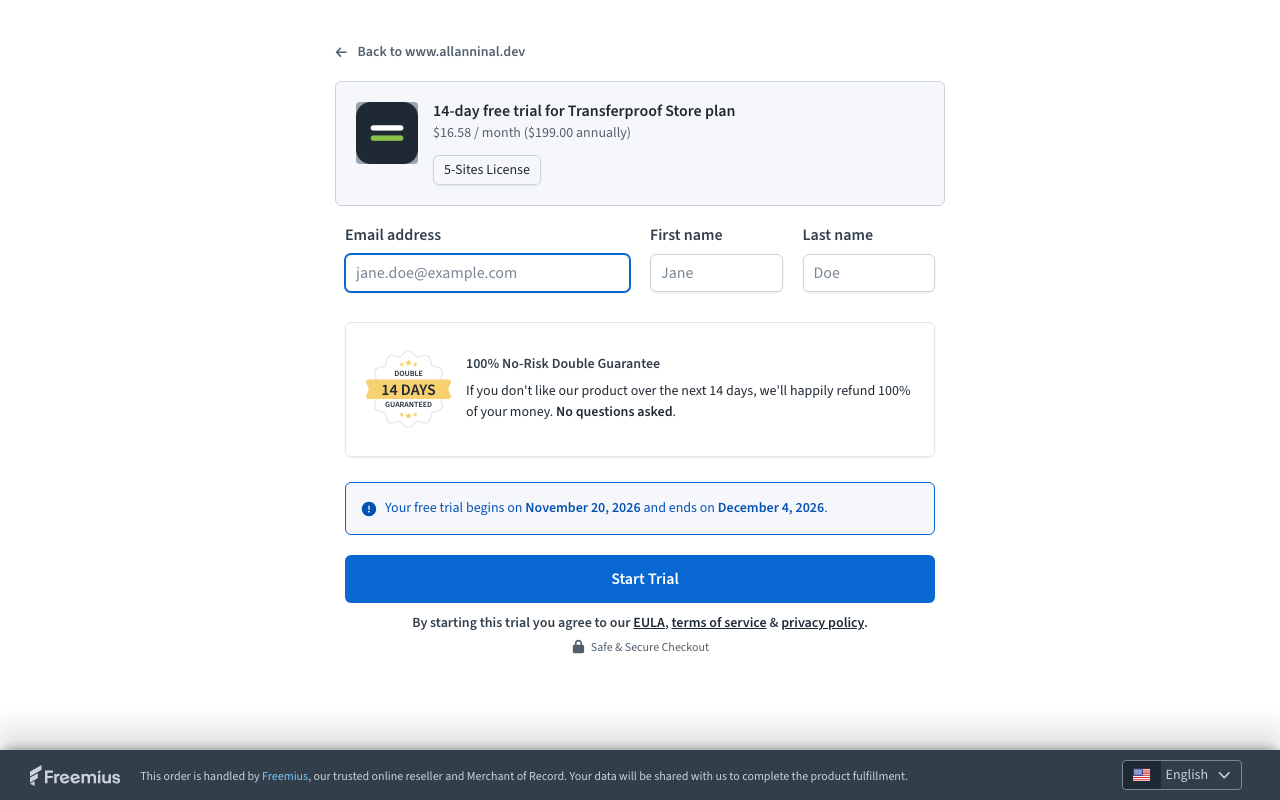
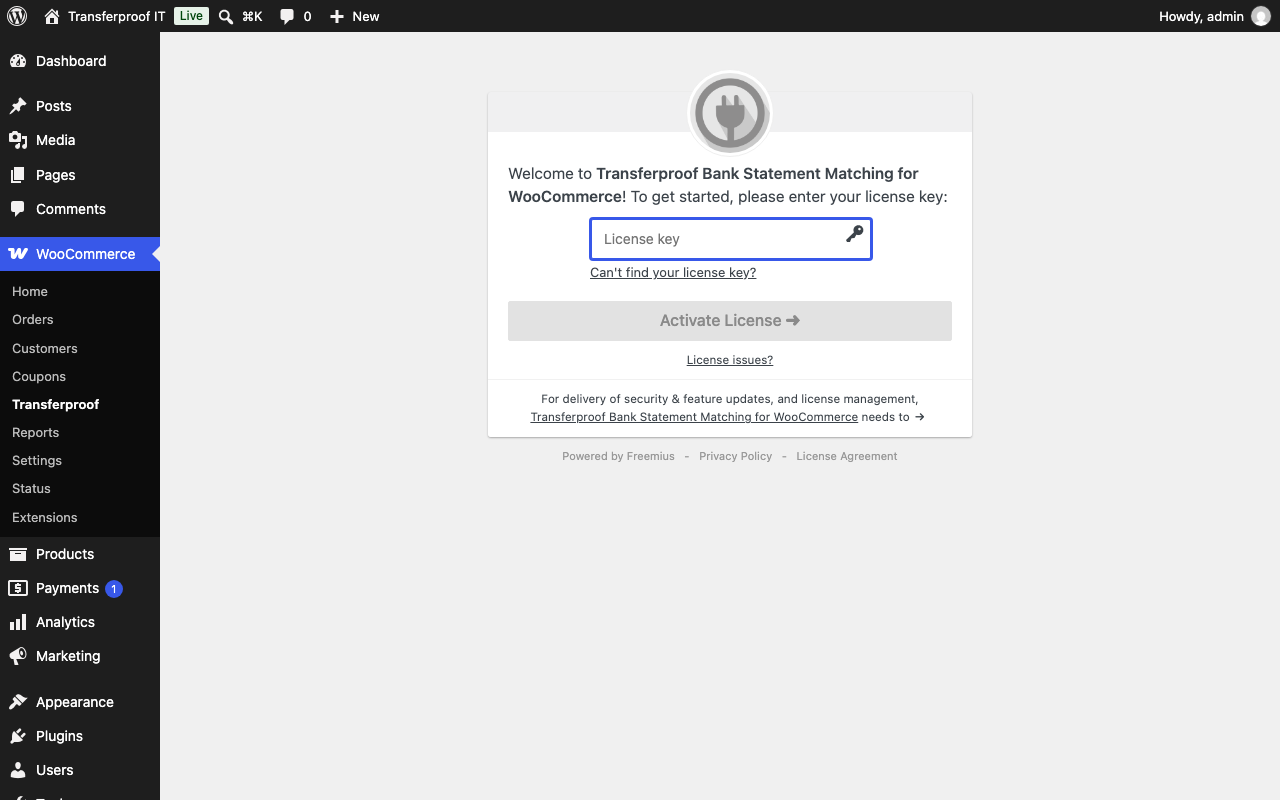
What starting a trial looks like: the checkout asks for an email and a name, no card. The key arrives by email and goes into the licence screen in WordPress.
Questions
The ones worth answering
Do I have to give it access to my bank account?
No. You download the statement from your online banking and import the file. Transferproof never logs in anywhere and contacts no bank or other service; the only outside service is Freemius, for the licence and updates.
What if a customer forgets the reference?
It looks for the order number in the payment text, then for unpaid orders with exactly that amount. If one order fits, it is suggested for you to approve; if several fit, you choose. It is never applied on the amount alone.
What if I import the same statement twice, or two that overlap?
Each payment is counted once. Payments already imported are reported as such and skipped.
What happens to the order when a payment is applied?
A full payment marks it paid as a payment gateway would: it moves on from On hold and the customer gets WooCommerce's own "order received" email. A part payment adds a note with what is still due. An invoice order that may already have shipped is recorded as paid without changing its status or sending an email.
Can I undo a payment applied by mistake?
Yes, from the log. The order goes back to unpaid, as it was. Emails already sent are not taken back, and the undo screen says so before you confirm.
Does it read invoice numbers from invoice plugins?
No. It reads the order number as WooCommerce reports it, which includes custom order numbers from plugins that use WooCommerce's own order-number filter.
What happens when the trial ends, or if I deactivate it?
Transferproof stops matching and shows customers no reference. Orders already marked paid stay paid. You see one locked screen with your log, read only, and your settings are kept.
Changelog
Version history
- 1.1.1 · 20 November 2026. German: 31 strings corrected after a full review, among them the plugin name and wording that made releasing a held payment read like approving one.
- 1.1.0 · 20 November 2026. German (de_DE): every admin screen, notice and message, the customer's payment reference and reminder email, in the terms German WooCommerce already uses („In Wartestellung“ for On hold).
- 1.0.0 · 20 November 2026. First release. camt.053, MT940 and CSV import with ten built-in bank layouts; matching by RF reference, order number and amount; part and split payments; dry run, Apply and undo; the reference and GiroCode for customers; optional reminder and auto-cancel; WP-CLI; privacy export and erase. Tested on HPOS and the older order storage.
What the first minute looks like
Start the trial, install the plugin, and open WooCommerce → Transferproof. Download last week's statement from your online banking and import it. Every payment is listed with the order it would pay and why, and nothing on any order has changed.