 Driftproof
WooCommerce · Stripe
Your store and Stripe keep two copies of the truth. Nothing checks they still agree.
Driftproof is a WooCommerce plugin that scans your Stripe account against your orders and tells you what disagrees — with the money beside it. Orders Stripe was paid for that still say unpaid. Authorizations about to lapse. Charges taken twice. Subscriptions that will fail their next renewal.
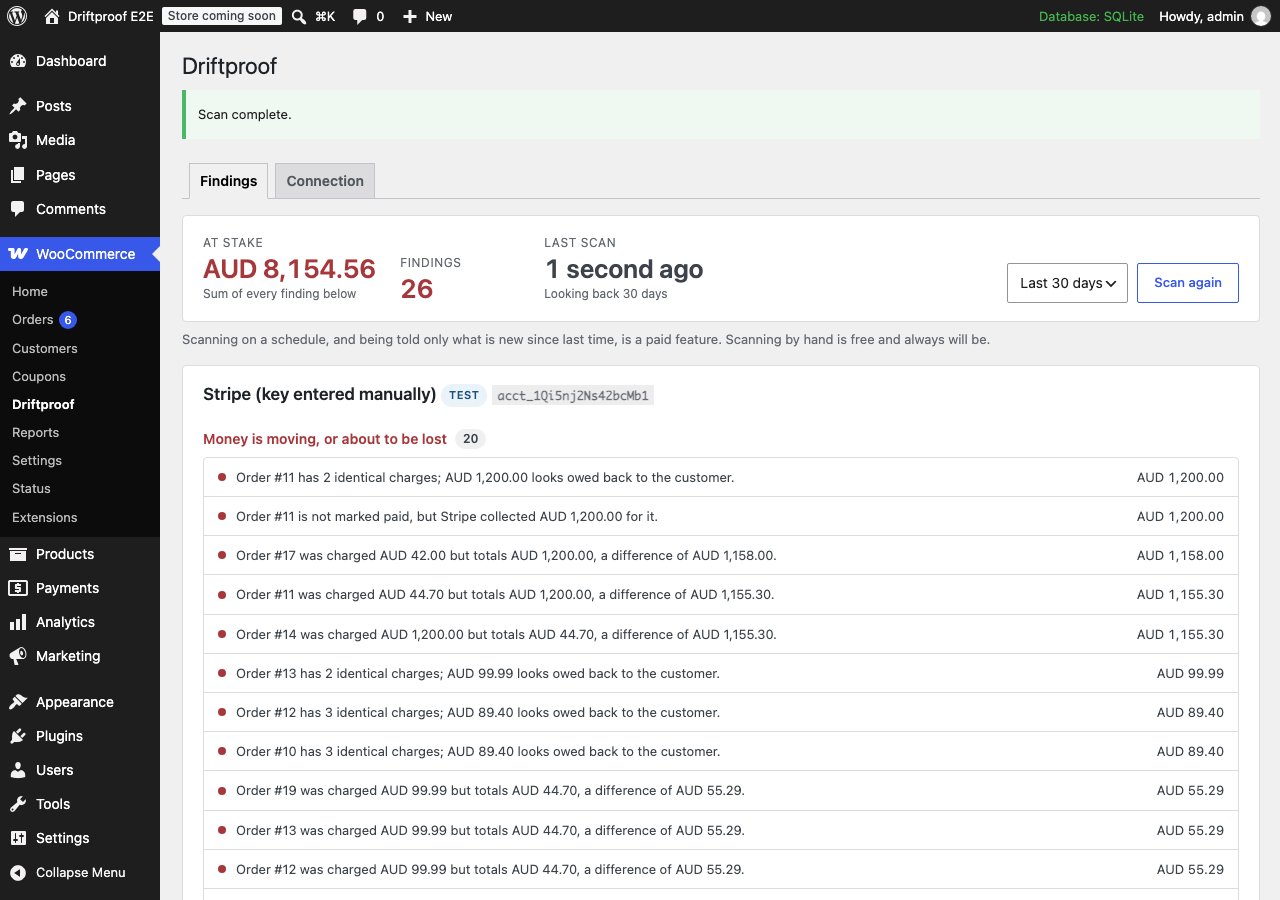
Real output from a live test account, not a mock-up.
WooCommerce says this order is pending Stripe says it was paid, four days ago
The arithmetic
What one of these costs, once
Priced at a $75 average order, because that is the only input this needs. Each of these is one instance of one check — not a projection, not an industry average.
One hold that lapsed
$75gone
The card was authorized and the capture never happened. After about seven days the hold expires and the money cannot be recovered — not by you, not by Stripe, not by asking the customer. Nothing else in your stack tells you the window is closing.
S1One charge taken twice
$150taken
A redirect racing a webhook, or a renewal retried after a timeout. If you find it, you refund $75 and apologise. If the customer finds it first it arrives as a chargeback instead — the amount, your gateway's dispute fee, and a deadline.
S1One subscription that stopped
$174and counting
A $29 plan whose renewal date sits in the past with nothing scheduled. It does not fail, alert, or churn — it just stops earning, and the customer keeps the access. Six months before anyone notices is normal, because nothing is looking.
S2Nobody can tell you how many of these your store has. Not us, and not a vendor quoting an industry average — no such figure is published for a dropped webhook or a lapsed hold, and one invented for a sales page would be worth nothing. The scan is free, reads only, and prices every finding it makes. Solo is $190 a year; three lapsed holds, or one subscription that quietly stopped, is the whole licence.
Scan your store freeHow it works
Most of what goes wrong here is silent
Nothing errors. No order turns red. The webhook returned 200 and the money is somewhere it should not be — and you find out from a customer, a chargeback, or a month-end that will not reconcile.
Today
- A webhook is missed, retried, or matched to nothing.
- WooCommerce and Stripe quietly stop agreeing.
- Nothing in WordPress ever compares them.
- You find out weeks later, from someone who is annoyed.
With Driftproof
- It lists every relevant Stripe record for the window — about ten requests.
- It joins them against your orders and subscriptions in memory.
- Twelve checks run. Anything that cannot run says so.
- You get a list, worst first, with the money beside each line.
The checks
All twelve, on every plan including free
Each one comes from a failure documented in the WooCommerce field notes — a real symptom, with a real cause, that a real store hit. Every finding links back to the note that explains it.
Money on the table
- Authorization about to lapse
- A hold expires after about seven days and the money cannot be recovered. Nothing else warns you.
- Paid at Stripe, unpaid here
- The webhook returned 200 and the order never moved.
- Charged twice for one order
- A redirect racing a webhook, a retried renewal, a migrated server.
- Dispute not recorded
- A chargeback with a deadline, on an order that still reads as a completed sale.
- Charged a different amount
- Including the 100× case, where a zero-decimal currency is handled as if it had decimals.
- Refunded there, not here
- Your reports, totals and tax figures are all overstated until it is recorded.
Subscriptions — the half nothing else covers
- No saved card
- Active, renewing, and nothing to charge. It fails at the renewal and you hear about it from a churned customer.
- Card detached at Stripe
- The id is saved; Stripe no longer holds that card for that customer.
- Out of step with Stripe
- Cancelled at Stripe while you keep fulfilling — or cancelled here while Stripe keeps charging.
- Renewal overdue, nothing scheduled
- The quietest failure of all. The date sits in the past forever and the subscription silently stops earning.
Configuration and identity
- Test and live keys mixed up
- A live store holding a test key rejects every real payment. The reverse charges real cards for orders you think are simulated.
- Customer no longer exists
- A subscription linked to a Stripe customer that was deleted, merged, or lost in a migration.
Run all twelve, free Nothing to paste, nothing changed, no card.
Read first
The drift guide
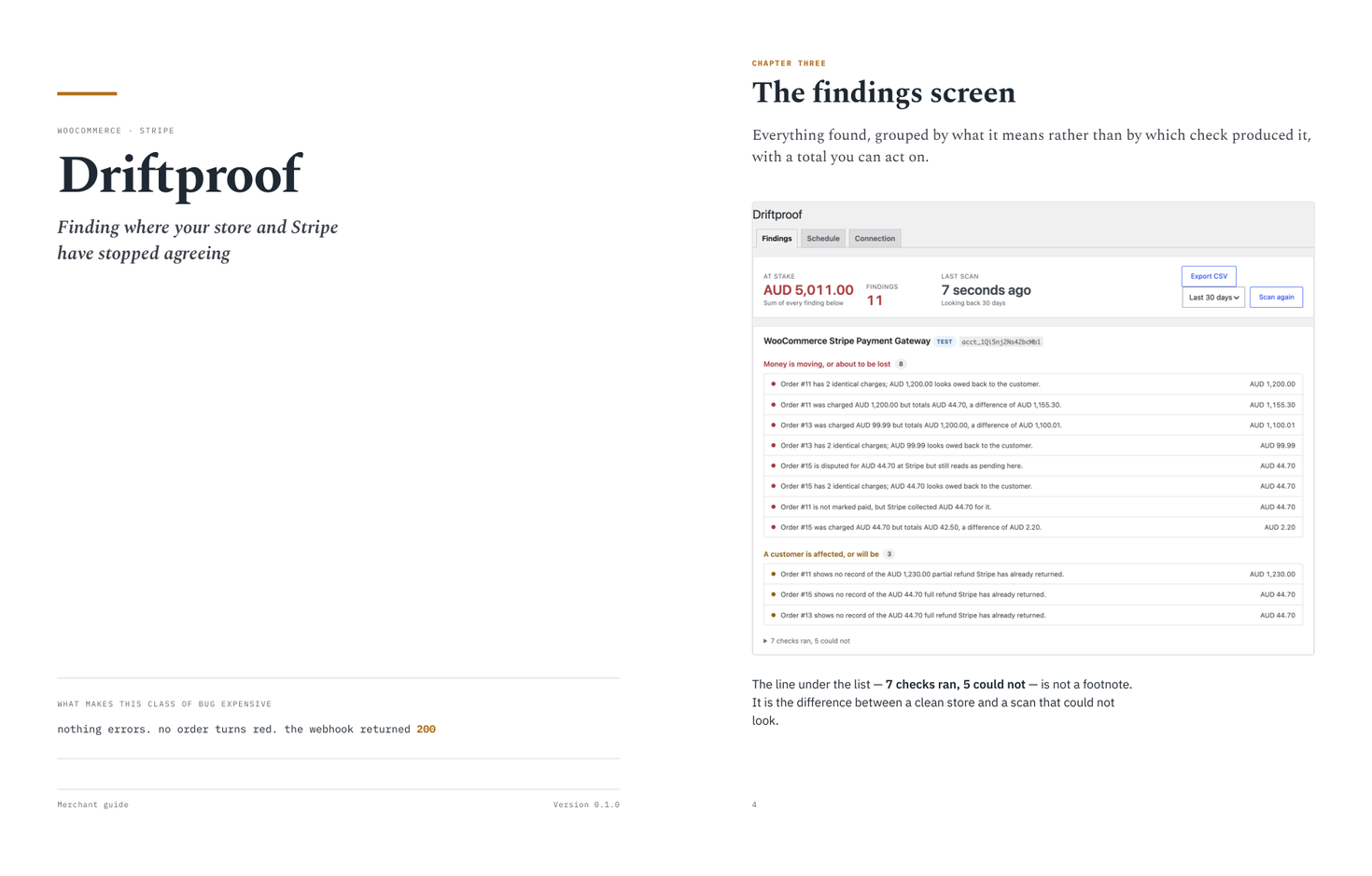
Thirteen pages on all twelve checks and what each one costs when it goes unnoticed, why a check that could not run is never reported as a pass, and how repair works — dry run first, money last, everything logged. The screenshot in it is a real scan of a live test account, not a mock-up.
13 pages · Letter · 338 KB · no email required
What makes it trustworthy
A scanner you can believe is worth more than one that finds everything
Every finding is priced
Not a severity badge and a shrug. The amount at stake, in your currency, on every line — and a total you can act on rather than a score you have to interpret.
It tells you what it could not check
A check that could not read the data it needs is not evidence your store is clean. Every scan says how many ran, how many could not, and why — because reporting a pass it did not earn is the one thing this plugin must never do.
Nothing to paste
It reads the credentials your Stripe gateway already holds and proves they work before claiming detection. Rotate your key and it follows, because no second copy is stored.
Dry run is the default
Everywhere. The plan it prints is exactly what running it would do.
Money moves last
Capturing and refunding are confirmed separately, never bulk, never on a schedule.
A record of everything
Every repair logged with what changed and who ran it — including the ones it declined.
Compare
Why not the tools you already have
| By hand | Order-status plugins | Driftproof | |
|---|---|---|---|
| Asks Stripe what actually happened | If you go looking | No — reads your own order status | Every check |
| Finds an order paid at Stripe but unpaid here | One at a time | Emails the customer to pay again | Yes |
| Warns before an authorization lapses | No | No | Yes |
| Audits for duplicate charges after the fact | Not realistically | No | Yes |
| Checks subscriptions before the renewal fails | No | No | Four checks |
| Tells you what it could not check | — | No | Always |
| Repairs it, with a dry run first | By hand, per order | No | Yes |
| Your data leaves the site | — | Depends | Never |
- Free forever, no card. All twelve checks, every scan, every finding priced.
- 14 days on any paid plan. No card to begin, and nothing charged if you stop.
- Scanning never changes anything. It reads. A restricted, read-only Stripe key is enough.
- Repair is never automatic. You choose each one. Dry run first, money last, every action logged.
Pricing
Finding it is free. Fixing it is not.
All twelve checks, every scan, every finding priced — on the free plan, forever. What you pay for is Driftproof doing something about them.
Free
$0
- All twelve checks
- Every finding priced
- Scan by hand, any time
- Read-only, always
- Accepts a restricted Stripe key
- WP-CLI included
Solo
$1916/mo
- One site
- Repair what it finds
- Full repair audit trail
- Daily scans
- Email when something is new
- Export it all as CSV
Every paid tier has the same features; what changes is how many sites the licence covers. Annual billing is ten months for twelve. Every paid plan starts with a 14-day trial and takes no card to begin.
Questions
The ones worth asking first
Do I need to paste Stripe API keys?
No. Driftproof reads the credentials your existing WooCommerce Stripe gateway already stores, and proves they work against Stripe before claiming anything. If you would rather narrow its access, you can supply a Stripe restricted key instead — it will tell you up front which repairs that rules out, rather than failing halfway through one.
Will it change anything on my store?
Not unless you ask it to, twice. Scanning is read-only and free forever. Repairs are a paid feature, a dry run is the default everywhere, and anything that emails a customer or moves money is confirmed separately from the harmless fixes. Nothing irreversible ever runs on a schedule.
What happens if a check cannot run?
It says so, on the screen, next to the findings. A check that could not read the data it needs is not evidence your store is clean, and reporting it as a pass is the one thing this plugin must never do. Every scan tells you how many checks ran and how many could not, with the reason for each.
Does it work with WooPayments?
It detects WooPayments and then tells you plainly that it cannot scan it. WooPayments never exposes Stripe API access, so there is nothing for Driftproof to compare your orders against. Saying so is more useful than quietly reporting no findings for that account.
How much does a scan cost me in API calls?
About ten requests for a thousand-order month. Driftproof lists each Stripe resource once across the window and joins it against your orders in memory, rather than looking up each order individually — which is what makes it usable on a store with tens of thousands of orders rather than only on a small one.
Does it work with WooCommerce Subscriptions?
Yes, and that is the half nothing else covers. Four checks look at subscriptions whose saved card Stripe no longer holds, that have no customer recorded at all, that Stripe has cancelled while WooCommerce keeps billing, and whose renewal date has passed with nothing scheduled to run it. If WooCommerce Subscriptions is not installed, those four decline rather than reporting your store clean.
Is my payment data sent anywhere?
No. Driftproof runs entirely inside your WordPress installation and talks only to Stripe. There is no third-party service in the path, and no copy of your credentials is stored — the key is read from your gateway at the moment it is needed, so rotating it takes effect immediately.
Find out what your store is not telling you
Every one of these twelve is already either happening or not, and today you have no way to tell which. The first scan on a store with any history behind it usually finds something; it takes a few minutes, changes nothing, and costs nothing. The worst outcome is a clean bill.